Add Parameter Files (Optional)
By default, MFG/UTIL displays all available .pf files found in the QAD Standard Edition system and client installation directories in the QAD UI configuration screen. You can specify additional directories for MFG/UTIL to search for other .pf files by using the UI|Edit Search Directories for UI Configuration Lookups option on the MFG/UTIL menu.
If your WebSpeed broker is on a different machine than the QAD Standard Edition databases, the parameter files must include client/server parameters to access the databases. These are the host (‑H), server (-S), and network protocol (-N) parameters.
1 Choose 3 on the main menu to launch MFG/UTIL.
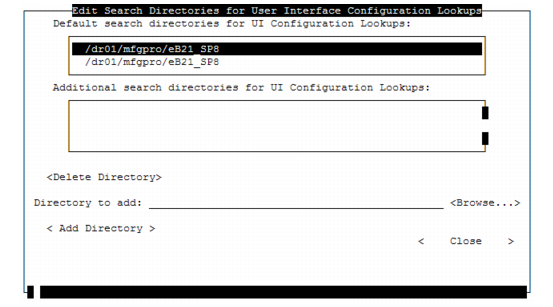
2 Select UI|Edit Search Directories for UI Configuration Lookups from the MFG/UTIL main menu.
3 To add a directory, enter its full path name in Directory to add and choose Add Directory. A .ksh file from a QAD UI installation must exist in the directory.
Edit Search Directories for UI Configuration Lookups
Note: If MFG/UTIL cannot find a directory specified here or if no .pf files are located in a specified directory, an error displays for each affected directory when you access the Configure QAD UI Environment Parameters screen.
Delete Directory
Deletes the selected directory from the list of directories to search. You cannot delete the default directories.
Directory to add
Adds a directory to the search list. Optionally, use the browse to locate the directory in the file system and select it. After entering the directory, choose Add Directory to add it.