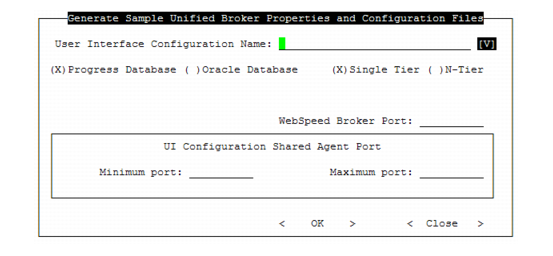
Generate WebSpeed Configuration Information
To update the WebSpeed ubroker.properties file with the QAD UI broker definitions, generate a parameter file in MFG/UTIL. The parameter file is merged into ubroker.properties in the next set of steps.
If you are implementing the QAD .NET UI, this screen displays additional fields in order to generate the Progress AppServer definitions.
1 In MFG/UTIL, choose UI|Generate Sample ubroker.properties File. The Generate Sample Unified Broker Properties and Configuration Files frame displays.
Generate Sample Unified Broker Properties and Configuration Files
2 Choose the configuration you are generating the file for in User Interface Configuration Name. Update the other fields as follows:
Progress Database/Oracle Database
Display-only. If this value is incorrect, the install script must be run again.
Single-Tier/N-Tier
Display-only. If this value is incorrect, the install script must be run again.
Make this configuration the default system
This field applies to the QAD .NET UI. Set this to Yes to generate both a qaduiConfig.xml and a default.xml file. The default configuration is the first configuration users log into. After initial login, they can access other configurations in the same environment by choosing Tools|Options and setting the System Preferences. When multiple systems are available, users can also choose to select from a list during login.
NS Host
The machine where the Progress Name Server is installed.
Name Server Port
By default this is 5162.
.NET App Server Port
The port for the .NET UI Progress AppServer. The default is 1300. Make sure the port you enter here is unused and available.
WebSpeed Broker Port
This port is used only by the .NET UI WebSpeed broker. The default is 5600. Make sure the port you enter here is unused and available.
UI Configuration Shared Agent Minimum Port
The minimum port for a range of shared agent ports available for UI user sessions. The typical range is 10. Make sure the entire range of ports you enter here is unused and available.
UI Configuration Shared Agent Maximum Port
The maximum port for a range of shared agent ports available for UI user sessions. Make sure the entire range of ports you enter here is unused and available.
3 Choose OK to generate the file for the UI configuration you selected.
The system displays a message that the file, qaduiConfig-ubroker.properties, was saved in your QADInstallDir. The generated file contains the complete definitions required by Progress to launch the AppServer and WebSpeed broker.
Generate this file for each UI configuration you are setting up.