Monitor Connections
Choose Connections to view the pool of active sessions. Each session has one of the following statuses:
• Initializing. The session is starting and is not available for use.
• Idle. The session is active and available for the next user request.
• Busy. The session is executing a user request.
• Pause. The session is waiting for a response from the user; for example, the user may need to press the spacebar to continue.
• Processing. The session is actively updating the Progress database and database records are locked.
• Force Disconnect. This is a temporary state that occurs when the administrator closes an initializing session.
• Disconnected. This is a temporary state that occurs when idle sessions are closed.
You can choose to view connections by status or view all connections. If you choose the Busy status, any sessions that have the Pause or Processing status also display. You must choose All to see sessions that have Disconnect statuses. These statuses do not occur in normal operations.
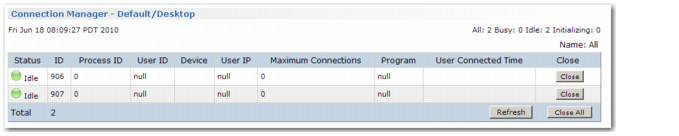
Monitoring Connections illustrates the screen for monitoring connections.
Monitoring Connections
Use Refresh to update the display. Choose Close to close unneeded sessions.