Reset Domain Fields
You now connect to the conversion database and reset the domain fields to blank. During the conversion, a domain value is required at the schema level to permit the creation of new records in the database. However, during normal database operation, the domain field must be assigned to the user’s current domain, requiring that the domain value at the schema level start out as blank. This step accomplishes that change.
1 You are prompted to connect to your conversion database as target. Always verify the database name and path, especially if you are performing more than one conversion using this MFG/UTIL version.
Connect to Target Database
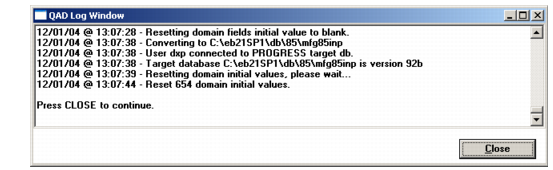
2 The Log Window displays to confirm database connection and show domain reset progress.
Domain Reset Log
3 Choose Close to continue.