Error | Explanation |
GST class must exist 0%. | The GST class master must have at least one GST class with a zero percentage. |
Freight, brokerage, or duty charges cannot be converted. | There is no equivalent ability in GTM. |
Detail tax environment must match header. | In accounts payable vouchers and accounts receivable debit/credit memos, the tax environment must be the same in both the header and detail lines. |
Status | Tax System | pod_taxable | prh_tax_at |
Taxable | CAN | Yes | Tax class |
GTM | Yes | “Yes” | |
Non-taxable | CAN | No | “0” |
GTM | Yes | “Yes” |
Status | Amt | Tax System | GST | TxC | vod_type | vod_tax | vod_tax_at |
Taxable | Item | CAN | Yes | GST class | “R” | Blank | GST class |
GTM | Yes | Tax class | “R” | Blank | “Yes” | ||
Tax | CAN | No | Blank | Blank | GST class | Blank | |
GTM | No | Blank | “T” | “t” | “No” | ||
Non-taxable | Item | CAN | No | Blank | “R” | Blank | 0% GST class |
GTM | Yes | Tax class | “R” | Blank | Blank | ||
Tax1 | CAN | No | Blank | Blank | GST class | Blank | |
GTM | – | – | – | – | – |
Status | Amt | Tax System | GST | TxC | vod_type | vod_tax | vod_tax_at |
Taxable | Item | CAN | Yes | Blank | Blank | Blank | GST class |
GTM | Yes | Tax class | Blank | Blank | “Yes” | ||
Tax | CAN | No | Blank | Blank | GST class | Blank | |
GTM | No | Blank | “T” | “t” | “No” | ||
Non-taxable | Item | CAN | No | Blank | Blank | Blank | 0% GST class |
GTM | Yes | Tax class | Blank | Blank | “No” | ||
Tax1 | CAN | No | Blank | Blank | GST class | Blank | |
GTM | – | – | – | – | – |
Status | Amt | Tax System | ard_tax | ard_tax_at | ard_taxc |
Taxable | Item | CAN | Blank | GST class | Blank |
GTM | Blank | Tax class | Tax class | ||
Tax | CAN | GST class or blank1 | Blank | Blank | |
GTM | “t” | “No” | Blank | ||
Non-taxable | Item | CAN | Blank | 0% GST class | Blank |
GTM | Blank | Tax class | Tax class | ||
Tax2 | CAN | 0% GST class | Blank | Blank | |
GTM | – | – | – |
Status | Amt | Tax System | ard_tax | ard_tax_at | ard_taxc |
Taxable | Item | CAN | Blank | GST class | Blank |
GTM | Blank | “Yes” | Tax class | ||
Tax | CAN | GST class1 | Blank | Blank | |
GTM | “t” | “No” | Blank | ||
Non-taxable | Item | CAN | Blank | 0% GST class | Blank |
GTM | Blank | “No” | Tax class | ||
Tax2 | CAN | – | – | – | |
GTM | – | – | – |
Table | Summary of Changes |
ard_det | For debit/credit memos, txcanarm.p sets ard_tax and ard_tax_at. It also sets ard_taxc (GST only), ard_tax_usage, and ard_tax_at. |
ar_mstr | For debit/credit memos, txcanarm.p sets ar_tax_env. |
ca_mstr | txcanca.p sets ca_taxc and ca_tax_usage from ca_taxc or from the class file, if any. If cm_pst is No, ca_taxc is GST only; otherwise, it is GST + PST. It also sets ca_tax_env using txtxeget.p. |
idh_hist | txcanari.p sets idh_taxc and idh_tax_usage from idh_taxc or from the class file, if any. It sets idh_taxable to Yes. If idh_pst is No, idh_taxc is GST only; otherwise, it is GST + PST. It also sets idh_tax_env using txtxeget.p. |
ih_hist | txcanari.p sets ih_taxable to Yes and ih_pst_pct to 0. It sets ih_taxc (GST only) and ih_tax_usage from ih_taxc or from the class file, if any. It also sets ih_tax_env using txtxeget.p. |
itm_det | txcanca.p sets itm_taxc (GST + PST) and itm_tax_usage from itm_taxc or from the class file, if any. It sets itm_taxable to Yes. It also sets itm_tax_env using txtxeget.p. |
pod_det | txcanpo.p sets pod_taxable to Yes and pod_tax_env using txtxeget.p. If pod_pst is No, then pod_taxc is 0; otherwise, pod_taxc is 0P. |
po_mstr | txcanpo.p sets po_tax_pct[1], po_tax_pct[2], and po_tax_pct[3] to 0. It sets po_taxable to Yes. It sets po_taxc and po_tax_usage from the ad_taxc value for the corresponding supplier. It also sets po_tax_env using txtxeget.p. |
prh_hist | txcanpo.p sets prh_taxc from pod_taxc, prh_tax_usage from pod_tax_usage, and prh_tax_env from pod_tax_env. Since po_taxable is Yes, it sets prh_tax_at to Yes. |
qod_det | txcanqo.p sets qod_taxable to Yes. It sets qod_taxc and qod_tax_usage from qod_taxc or from the class file, if any. It sets qod_taxable to Yes. If qod_pst is No, tax class is GST only; otherwise, it is GST + PST. It also sets qod_tax_env using txtxeget.p. |
qo_mstr | txcanqo.p sets qo_tax_pct[1], qo_tax_pct[2], and qo_tax_pct[3] to 0. It sets qo_taxable to Yes and qo_pst_pct to 0. It sets qo_taxc and qo_tax_usage from qo_taxc or from the class file, if any. If cm_pst is No, tax class is GST only; otherwise, it is GST + PST. it also sets qo_tax_env using txtxeget.p. |
rma_mstr | txcanrma.p sets rma_taxc from rma_taxc or from the class file, if any. It sets rma_taxable to Yes. If cm_pst is No, tax class is GST only; otherwise, it is GST + PST. |
sad_det | txcansc.p sets sad_taxc and sad_tax_usage from sad_taxc or from the class file, if any. It sets sad_taxable to Yes. If sad_pst is No or sa_prefix is QA, tax class is GST only; otherwise, it is GST + PST. It also sets sad_tax_env from sa_site and sa_taxc using txtxeget.p. |
sa_mstr | txcansc.p sets sa_tax_pct[1], sa_tax_pct[2], and sa_tax_pct[3] to 0. It sets sa_taxable to Yes and sa_can_tax to 0. It sets sa_taxc and sa_tax_usage from sa_taxc or from the class file, if any. If cm_pst is No, tax class is GST only; otherwise, it is GST + PST. It also sets sa_tax_env using txtxeget.p. |
sfb_det | txcanca.p sets sfb_taxc from itm_taxc and sfb_tax_usage from itm_tax_usage. It sets sfb_taxable to Yes. It also sets sfb_tax_env using txtxeget.p. |
sod_det | txcanso.p sets sod_taxc and sod_tax_usage from sod_taxc or from the class file if any. It sets sod_taxable to Yes. If sod_pst is No, tax class is GST only; otherwise, it is GST + PST. It also sets sod_tax_env using txtxeget.p. |
so_mstr | txcanso.p sets so_taxable to Yes and so_pst_pct to 0. It sets so_tax_pct[1], so_tax_pct[2], and so_tax_pct[3] to 0. It sets so_taxc and so_tax_usage from so_taxc or from the class file, if any. If cm_pst is No, tax class is GST only; otherwise, it is GST + PST. It also sets so_tax_env using txtxeget.p. |
tx2d_det | txcanpo.p creates tax details for purchase orders (GTM transaction type 20), receivers (21), reconciliations (23), and returns (25). txcanapv.p creates tax details for vouchers (22) and recurring vouchers (32). txcanapp.p creates tax details for accounts payable tax on discount at payment (29). txcanqo.p creates tax details for sales quotes (10). txcanso.p creates tax details for invoiced service calls (38), return material authorizations (36), sales orders (11), and pending invoices (13). txcanarm.p creates tax details for debit/credit memos (18). txcanari.p creates tax details for invoices (16). txcanarp.p creates tax details for accounts receivable tax on discount at payment (19). txcansc.p creates tax details for service quotes (33) and service contracts (34). |
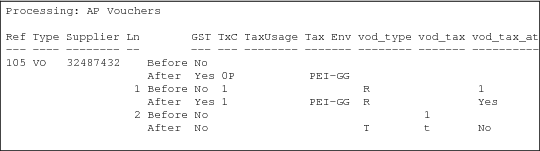
vod_det | txcanapv.p sets vod_taxable to Yes. It sets vod_taxc (GST only) and vod_tax_usage from vod_tax_at. It sets vod_tax, vod_tax_at, and vod_type. It also sets vod_tax_env using txtxeget.p. |
vo_mstr | For vouchers, txcanapv.p sets vo_tax_pct[1], vo_tax_pct[2], and vo_tax_pct[3] to 0. It sets vo_taxable, vo_taxc, and vo_tax_usage. It also sets vo_tax_env using txtxeget.p. |