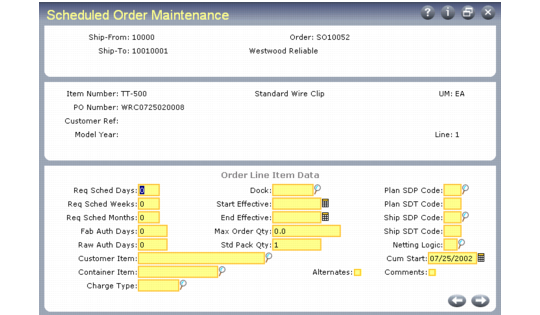
Order Line Item Data Frame
The following frame always displays.
Scheduled Order Maintenance, Order Line Item Data Frame
Req Sched Days, Req Sched Weeks, Req Sched Months
These fields rebucket customer requirements into a sequential horizon of days, then weeks, then months.
Entering values in these fields has an impact on MRP. The weekly and monthly quantities are seen by MRP as requirements on the first day of the period, and MRP plans accordingly. This can result in excessive and unnecessary action messages.
Set these fields to zero to maintain the customer’s date and quantity requirements. Also leave these fields set to zero if you are using noncumulative accounting procedures and pegging requirements through authorization numbers.
Fab Auth Days, Raw Auth Days
Raw and fabrication authorization commitments are made to give suppliers some protection against sudden and unforeseen reductions in demand.
• Raw quantity is the quantity of product the customer commits to covering component costs.
• Fab quantity is the quantity of product the customer commits to covering manufacturing costs.
These fields are used by Customer Plan Schedule Maint (7.5.1) to calculate the authorization quantities, in the event customer authorizations are for a number of days into the future.
The Schedule Report (7.5.10) shows all authorizations by release, then prints the highest of each type authorization, referencing the release ID of each. The highest of each type is determined by the highest quantity or the latest end date.
Customer Item
Enter the item number used by the customer. This number appears on ASNs and invoices in place of your internal item number. The value that displays in this field defaults from the Item field or Customer Ref field. See
Customer Ref is Customer Item.
Container Item
Optional container item number, used for shipping the scheduled order item. The Required Ship Schedule Detail Report (7.5.14) display this number, if defined.
Dock
Optionally, enter a valid dock address for this customer ship-to address. Items are delivered to this dock.
Start and End Effective
Optional dates controlling the introduction and duration of this line item on the order. Warning messages display for orders released before or after the effective dates.
Max Order Qty
Enter the maximum, cumulative quantity for the life of this order. When this quantity has been exceeded, the system displays warning messages at order updates, maintenance functions, inquiries, and reports.
Std Pack Qty
Enter the value used for shipping orders for this item. This field is similar to Order Multiple in the item master, but appears here because the standard shipment multiple may be different for different customers. The schedule update rounds order quantities up to this multiple. In order to preserve the scheduled order packing multiple, you must remove any order multiple specified in Item Master Maintenance (1.4.1).
Plan SDP, Ship SDP
Enter a code specifying the default ship/delivery pattern. These codes indicate the days of the week or month that shipments or deliveries are required.
The schedule update functions use this code to determine due dates for shipping the order. SDP codes can differ for shipping and planning schedules. For instance, if planning schedules are not used, leave these fields blank to avoid any rescheduling of the planning dates, while the ship schedule is rescheduled based on your shipping days.
SDP codes support both the ODETTE and Automotive Industry Action Group (AIAG) ship/delivery patterns. They are translated to the appropriate industry-standard code during EDI conversion and transmission.
Netting Logic
Determines which schedule types the system uses to create the required shipping schedule.
1: Use the ship schedule only.
2: Use the plan schedule only.
3: Combine the planning and shipping schedules, with the shipping schedule taking precedence where the schedules overlap. This is known as replace logic.
4: Combine planning and shipping schedule with the greater of the shipping or planning schedule taking precedence when the schedules overlap. This is known as consume logic.