Configuration Page
To access the screen where you configure the main menus, choose System Settings|System Values in the left pane. Alternatively, you can type admin in the QuickPath field and click GO. Next, on the Admin page, click System Value Setup.
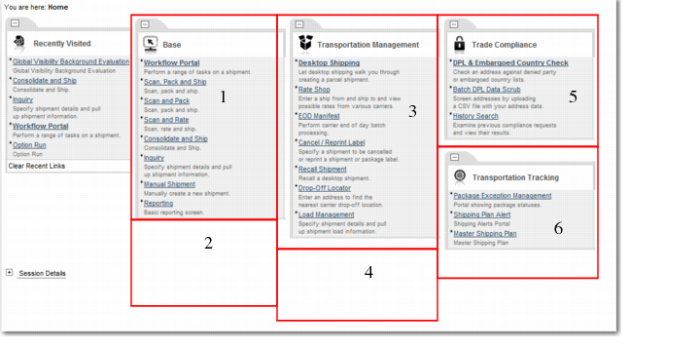
The Look and Feel tab is displayed by default. The main menu items are on this list in the format MAIN - MENU number#. This maps to the ITRAX category system values MAIN - MENU [1-6].
There are six main menus available for configuration. Four are used by default. They are MAIN MENU 1, 3, 5, and 6. The other menus are empty containers you can configure yourself. The six menus are positioned on the screen according to the labels in
Main Menu Screen.
Main Menu Screen