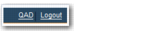
Title Bar Links
There are five system values for configuring the top links. If you do not activate these values, the system defaults are used. The default links are Home, About Precision, Contact, and Logout. These links are still displayed if you set the value of each one to Is Set and leave the values blank. However, when you supply any value in the Value field, the default links disappear, except for the Logout link, which cannot be changed or removed. Instead, the link you have created is displayed. The link is a comma-separated list and contains three pieces of information:
• The name of the link
• The URL
• If the URL is to open in a new or existing window
For example, to set the system value to point to the QAD Web Site and to open it in a new window, type QAD,http://www.qad.com,y and save the value.
Title Bar Links displays the resulting screen title bar link.
Title Bar Links