Adding Menu Items
You can also create your own menu items using the MY_SETTINGS system value. The properties file supplies some items by default:
precision.menu.mysettings.num=5
precision.menu.mysettings.separator=,
precision.menu.mysettings.menuitem1=Black Box Test Page,/precision/htm/btraxtest.htm
precision.menu.mysettings.menuitem2=Black Box Load Test Page,/precision/htm/btraxloadtest.htm
precision.menu.mysettings.menuitem3=Single Sign On Test Page,/precision/htm/sso-demo.htm
precision.menu.mysettings.menuitem4=Highway,/HighwayConsole target=_highway
precision.menu.mysettings.menuitem5=Precision Software,http://www.precisionsoftware.com target=_psl
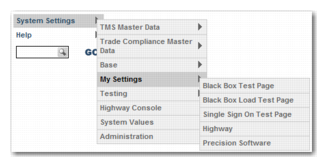
To edit the items to point to your pages, replace the link name and URL. To display them in the left menu, add the MY_SETTINGS value to the menus to display. After you have cleared the cache, the items are displayed as in
Left Menu.
precision.menu.display=BASE_ALL,TMS_ALL,TC_ALL,TT_ALL,SYSTEM,HELP,QUICKPATH, MY_SETTINGS
Left Menu