Authentication > Synchronize Users with DSML > Setting Up DSML in PRECISION
  
Setting Up DSML in PRECISION
Before testing DSML functionality in PRECISION, ensure that:
A directory service exists.
A DSML gateway is set up.
A gateway is a network service that translates DSML SOAP requests to LDAP Data Interchange Format (LDIF) requests and forwards them to a directory service for processing. The LDIF responses are then transformed back into DSML responses and returned to the client.
A DsmlController exists that can connect to and query a directory service through a configured DSML gateway. This facility is available from Web UI 4.7.5-OPEN onwards.
The DSML system values listed in DSML System Values have the correct values.
You can use log4j to log information as authentication takes place. For more information on log4j and DSML, see Troubleshoot with log4j.
DSML System Values
DSML System Values lists the system values that you require to configure DSML synchronization in PRECISION.

DSML System Values
 
Category
Key
Description
Property in the precision.properties File
DSML
DN
The root folder in which to start the DSML search.
Example:
OU=Users, OU=Accounts, DC=qad, DC=com
A directory server is a tree of directory entries, and each entry has a unique identifier or distinguished name (DN). The DN is written left to right, for example bill.people.domain.com is written as: uid=bill, ou=people, dc=domain, dc=com.
uid=bill is the entry’s Relative Distinguished Name (RDN)
ou=people is the organizational unit
ou=people , dc=domain, dc=com is the DN of the parent entry, where DC denotes domain component, and OU denotes organizational unit.
dsml.dn
DSML
EMAIL NOTIFICATION
A comma-separated list of e-mail addresses to receive notifications of the DSML search results.
Default value: The e-mail address of the user who is logged in.
dsml.emailnotification
DSML
ENABLE DSML
This value determines if the Admin page displays a link to manually invoke the DSML search.
Possible values: yes, no
Default value: no
 
DSML
FILTER
The filter used in the DSML search, which is based on the filter query syntax for DSML V2.
dsml.filter
DSML
PASSWORD
The user password for the DSML Gateway.
This password must be Base64 encoded.
dsml.password
DSML
RESULT-FILE-LOCATION
The location of the DSML search results file.
Default value: C:/PRECISION/WebUI/data/dsml/results
dsml.resultFilelocation
DSML
URL
The URL of the active DSML gateway.
Example: http://localhost:8080/dsml/DSMLServlet
dsml.url
DSML
USER
The user ID of the user who has access to the DSML gateway.
dsml.user
DSML
USER-MAP-LOCATION
The location of user-map.xml. This file determines the field mapping that applies when creating new users.
Default value: C:/PRECISION/WebUI/data/dsml/user-map.xml
dsml.usermaplocation
DSML XML Messages
The format of DSML XML messages is standardized and available from OASIS.
Example DSML Search Request
<?xml version="1.0" encoding="UTF-8" ?>
<soap-env:Envelope
xmlns:xsd="http://www.w3.org/2001/XMLSchema"
xmlns:xsi="http://www.w3.org/2001/XMLSchema-instance"
xmlns:soap-env="http://schemas.xmlsoap.org/soap/envelope/">
<soap-env:Body>
<batchRequest
xmlns="urn:oasis:names:tc:DSML:2:0:core"
requestID="Batch of search requests">
<searchRequest
dn=""
requestID="search on Root DSE"
scope="baseObject"
derefAliases="neverDerefAliases"
typesOnly="false" >
<filter>
<and>
<equalityMatch name="objectCategory">
<value>Person</value>
</equalityMatch>
<equalityMatch name="memberOf">
<value>CN=QAD_APP_EA,OU=Groups,OU=Applications,DC=qad,DC=com</value>
</equalityMatch>
</and>
</filter>
<attributes>
<attribute name="uid" />
<attribute name="mail" />
<attribute name="displayName" />
<attribute name="memberOf" />
<attribute name="c" />
<attribute name="givenName" />
<attribute name="sn" />
</attributes>
</searchRequest>
</batchRequest>
</soap-env:Body>
</soap-env:Envelope>
Example DSML Search Response
<soap-env:Envelope xmlns:SOAP-ENV="http://schemas.xmlsoap.org/soap/envelope/">
<soap-env:Body>
<batchResponse xmlns="urn:oasis:names:tc:DSML:2:0:core" requestID="Batch of search requests">
<searchResponse>
<searchResultEntry dn="CN=kws,OU=Users,OU=Accounts,DC=qad,DC=com">
<attr name="c">
<value>US</value>
</attr>
<attr name="description">
<value>Software Engineer, Architect - Research &amp; Development</value>
</attr>
<attr name="displayName">
<value>Kevin Schantz</value>
</attr>
<attr name="memberOf">
<value>CN=QDN_Editors,OU=Groups,OU=Accounts,DC=qad,DC=com</value>
<value>CN=QAD_Employees_Group,OU=Groups,OU=Accounts,DC=qad,DC=com</value>
<value>CN=Project X,OU=NotInUse,OU=Groups,OU=Accounts,DC=qad,DC=com</value>
</attr>
<attr name="department">
<value>R &amp; D Software Foundation, Director</value>
</attr>
<attr name="name">
<value>kws</value>
</attr>
<attr name="uid">
<value>kws</value>
</attr>
<attr name="mail">
<value>[email protected]</value>
</attr>
</searchResultEntry>
<searchResultDone>
<resultCode code="0"/>
</searchResultDone>
</searchResponse>
</batchResponse>
</soap-env:Body>
</soap-env:Envelope>
Mapping Attributes of DSML XML Messages to PRECISION
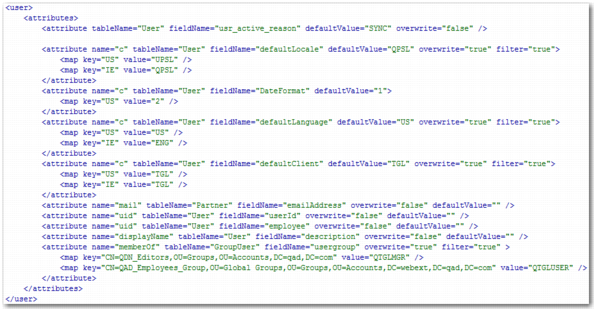
The user-map.xml file maps the attributes and corresponding values returned in the DSML response to the correct field names in the PRECISION user table.

Example user-map.xml File
The format of user-map.xml file is standardized and available from OASIS.
Example user-map.xml File
<user>
<attributes>
<attribute tableName="User" fieldName="usr_active_reason" defaultValue="SYNC" overwrite="false" />
<attribute name="c" tableName="User" fieldName="defaultLocale" defaultValue="QPSL" overwrite="true" filter="true">
<map key="US" value="UPSL" />
<map key="IE" value="QPSL" />
</attribute>
<attribute name="c" tableName="User" fieldName="DateFormat" defaultValue="1">
<map key="US" value="2" />
</attribute>
<attribute name="c" tableName="User" fieldName="defaultLanguage" defaultValue="US" overwrite="true" filter="true">
<map key="US" value="US" />
<map key="IE" value="ENG" />
</attribute>
<attribute name="c" tableName="User" fieldName="defaultClient" defaultValue="TGL" overwrite="true" filter="true">
<map key="US" value="TGL" />
<map key="IE" value="TGL" />
</attribute>
<attribute name="mail" tableName="Partner" fieldName="emailAddress" overwrite="false" defaultValue="" />
<attribute name="uid" tableName="User" fieldName="userId" overwrite="false" defaultValue="" />
<attribute name="uid" tableName="User" fieldName="employee" overwrite="false" defaultValue="" />
<attribute name="displayName" tableName="User" fieldName="description" overwrite="false" defaultValue="" />
<attribute name="memberOf" tableName="GroupUser" fieldName="usergroup" overwrite="true" filter="true" >
<map key="CN=QDN_Editors,OU=Groups,OU=Accounts,DC=qad,DC=com" value="QTGLMGR" />
<map key="CN=QAD_Employees_Group,OU=Global Groups,OU=Groups,OU=Accounts,DC=webext,DC=qad,DC=com" value="QTGLUSER" />
</attribute>
</attributes>
</user>
Ensure that:
The user-map.xml file correctly maps the list of possible countries to their corresponding:
Locale
Default language
Default client
The user-map.xml file correctly maps the list of possible memberOf groups to their corresponding PRECISION group role; this group role must exist in PRECISION.

Attribute Element in user-map.xml
 
Attribute Name
Default Value
Description
Required Attribute?
defaultValue
 
The default value to use when no value is provided in the DSML response.
no
fieldName
 
The field name mapping.
yes
filter
false
Use this attribute to remove attributes that do not match a mapping key. It is useful for filtering multiple values such as the memberOf attribute.
no
name
 
The Active Directory attribute name returned in the DSML response.
yes
overwrite
true
When true, the value is overwritten during an update of the user record. When false, the value is written during the creation of the user record only.
no
tableName
 
The table name mapping.
yes

Map Element within the Attribute Element in user-map.xml
 
Attribute Name
Description
Required Attribute?
key
The mapping key for matching an attribute value. This value is not case sensitive.
yes
value
The mapping value to replace the original value.
yes