Running DSML User Synchronization
Running DSML User Synchronization Manually
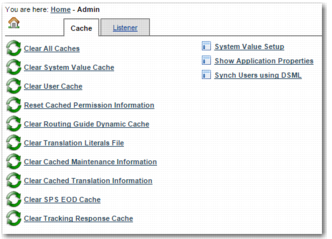
1 In PRECISION, specify ADMIN in the Quickpath field and click GO. Alternatively, from the System Setting link in the left menu, choose Administration.
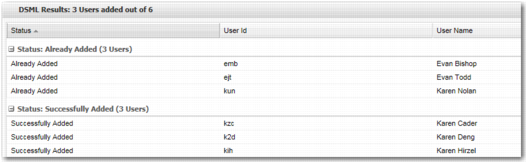
2 On the Administration page, click Synch Users using DSML to send a SOAP message containing a query based on the DSML - FILTER system value. Depending on the query result, the DSML Synch page displays a success message, a failure message, or a waiting message. A waiting message appears when the SOAP Request/Response is delayed due to a high number of users being added to the table.
Administration Page with Synch Users using DSML Option
DSML Synch Page, Success Message
DSML Synch Page, Failure Message
3 You can view the result in an e-mail address or a file. The EMAIL NOTIFICATION and RESULT_FILE_LOCATION system values described in
DSML System Values determine the file location. The e-mail subject matches one of the following lines:
• Precision - DSML Status Email - COMPLETED SUCCESSFULLY
• Precision - DSML Status Email - FAILURE
Running DSML User Synchronization as a Batch Job
When you have tested DSML User Synchronization by running it manually, you can set up a batch job to synchronize user login information on a daily basis.
1 Open the file /JBOSS_HOME/server/default/deploy/scheduler-service.xml.
2 Ensure that the following code is in the file scheduler-service.xml, and is not commented out.
<mbean code="org.jboss.varia.scheduler.Scheduler"
name=":service=Scheduler5">
<attribute name="StartAtStartup">true</attribute>
<attribute name="SchedulableClass">org.jboss.varia.scheduler.Initialize</attribute>
<attribute name="SchedulableArguments">ALWAYSSTART,http://localhost:8080/precision/htm/autologin.htm,targetUrl=/precision/htm/dsml.htm? action=getUserList&useridkey=userid&userid=xxxxxxx&userpassword=xxxxxxx&clientcode=TGL&databasealias=precisiondb,DSML</attribute>
<attribute name="SchedulableArgumentTypes">java.lang.String,java.lang.String,java.lang.String,java.lang.String</attribute>
<attribute name="InitialStartDate">NOW</attribute>
<attribute name="SchedulePeriod">86400000</attribute>
<attribute name="InitialRepetitions">-1</attribute>
</mbean>
3 Replace http://localhost:8080/precision/htm/autologin.htm,targetUrl=/precision/htm/dsml.htm with your URL.
4 Amend the userid and userpassword entries, which are defaulted to xxxxxxx, as these are required for the auto-login.
This job is set to run once every 24 hours (86400000 milliseconds).