Creating a Function Group
An option is a program that runs in the Web UI. In most cases, an option is displayed as a URL. A function group is a container for a group of options needed by a role. You can assign any number of options to one function group. To create a function group, complete the following steps.
1 In the QuickPath field, type FN and press Enter. Alternatively, on the left menu choose System Settings|Base|Application Configuration|Security|Function Group.
2 To create a new function group, click the Create button on the toolbar.
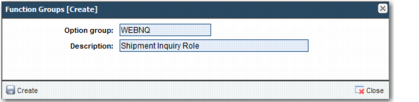
3 In the pop-up window, supply a meaningful Option group name and description, as shown in
Create Function Group.
Create Function Group