Breakpoint Tasks
When you create a task, the breakpoint option is selected by default. Breakpoint tasks return control to the user after a task has completed. For example, a user may click the manifest task in the tasks area to run the task. After the task is complete, control returns to the user, who can then choose what to do next.
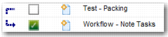
You can also set up tasks so that they are not breakpoint tasks. In this case, when a non-breakpoint task is complete, the following task is run without returning control to the user. Non-breakpoint tasks have a blue arrow next to them in the task area, to indicate that the following task is run immediately after the non-breakpoint task.
Non-breakpoint Task