Workflow
This section describes how to configure the Workflow functionality.
OverviewDescribes a workflow, and how workflows can be used to model business processes.
Configuring UI OptionsDescribes how to configure the appearance of the Workflow screen.
Creating a WorkflowDescribes how to create a workflow, including how to create shipment types, pre- and postrequisite tasks, checks, and breakpoints.
Case StudyDocuments the creation of a workflow to match a sample business process.
Overview
A workflow is a set of tasks that is associated with a transaction. Workflows mirror business processes within a company.
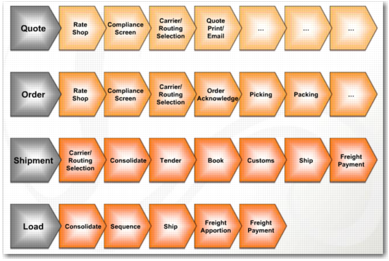
Workflows Mirror Business Processes illustrates some typical business processes involving quote, order, shipment, and load transactions.
Workflows Mirror Business Processes
As an administrator, you can create workflows to match your company business processes, and associate them with relevant transaction types. You can then ensure that users adhere to these workflows by limiting user access to tasks, making certain tasks pre- and postrequisites of other tasks, and adding checks and breakpoints.
This chapter describes how to:
• Configure Workflow in the Web UI.
• Create a workflow and workflow tasks.
It outlines how rulebooks and shipment types can determine the workflow associated with a particular transaction. It also explains how to create pre- and postrequisite tasks, and how to insert checks and breakpoints into a workflow.
Note: Before configuring Workflow, it is recommended that you read the Workflow chapter in the Base Web UI User Guide for a detailed description of how the Workflow functionality works from a user perspective. If you want to set up Workflow for the Windows UI, read Topic 016 Workflow, which is in the QAD Document Library.