Merging Tasks
There are often two versions of the same task: one that runs in the Windows UI and one that runs in the Web UI. Usually, Windows UI tasks have a program type of 02 and Web UI tasks have a program type of 50. Sometimes it is important to be able to view the result of a Windows UI task in the Web UI.
For example, if the manifest task fails, it is important that users of both the Windows and Web UI are aware of this. There are two manifest tasks:
• SHSH06 Charges - Ship/Manifest, which is the Windows UI task
• WFTMAN Workflow - Manifest Task, which is the Web UI task
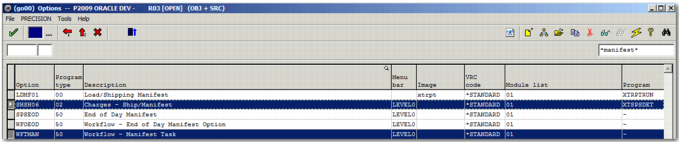
You can view details of each of these tasks using the GO option in the Windows UI. Search for *manifest* to see a list of manifest tasks.
Manifest Tasks
To merge the Windows UI and Web UI tasks:
1 Select the Web UI task, WFTMAN.
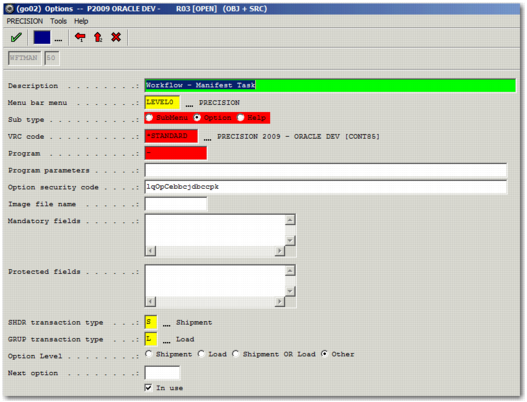
2 Click F7 or click the Update an entry button in the top right menu. The task option details appear.
Task Option Details
3 The program field contains a dash only. Scroll down to the Web UI URL field, which contains /htm/manifest.task. Copy the text in this field.
4 Click the red back arrow to return to the list of manifest tasks.
5 Select the Windows UI task, SHSH06.
6 Click F7 or click the Update an entry button in the top right menu. The task details appear. Note that the Program field contains the name of the 4GL program related to this task.
7 Scroll down to the Web UI URL field, and paste the URL that you copied from the Web UI task. Click the green check mark button to process this change and return to the list of manifest tasks.
8 Click the red check mark button to go to the main menu.
9 Go to the WF option.
10 Search for the workflow in which you wish to merge the Windows and Web UI tasks. When you have found the workflow, double-click it to see the list of tasks.
11 Select the Windows UI task from the task list.
12 Click F7 or click the Update an entry button in the top right menu. The task details appear.
13 Set the Availability field to Both.
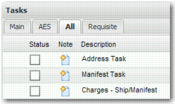
The tasks are now merged, and the Windows task, Charges - Ship/Manifest now shows as enabled in the Web UI.
Windows Task Enabled in the Web UI
Clicking this task in the Windows UI runs the 4GL program XTSPSDET, while clicking on the task in the Web UI opens /htm/manifest.task.