Adding Rule Determinations for a Rulebook
On the Rulebooks tab, the Rules Determinations for Rulebook <RULEBOOK_NAME> section allows you to specify the:
• Rules that the rulebook contains
• Rulebooks that the rulebook contains
• Conditions under which a rule or rulebook within this rulebook applies
Note: You can use the Assigned Rules Web UI Workflow task, SHSU, to see a list of the rulebooks and rules that fired against a shipment.
You can select a row in the Rules Determination for Rulebook <RULEBOOK_NAME> grid and click the Rules button below the grid to open the Rules tab with the relevant rule displayed in the Rules grid.
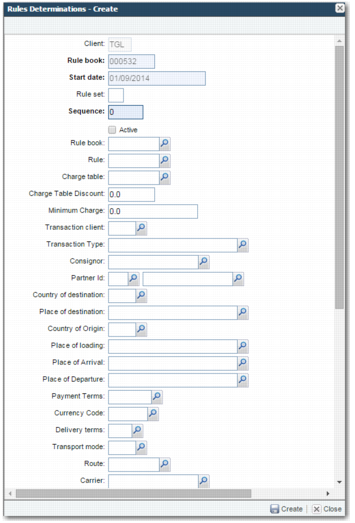
To create a rule determination for a rulebook, select the master rulebook in the grid, and click Create in the Rules Determinations for Rulebook <RULEBOOK_NAME> section.
Rules Determinations - Create
Client, Rule book, Start date
These fields are read only, and depend on the master rulebook.
Rule set
Rule sets allow you to specify that a rule or rulebook only applies to a shipment when the rule set of the shipment matches the rule set specified in the Rules Determinations - Create screen. The system value USE TRANS TYPE AS RULE SET allows you to specify that the values of the Rule set field must refer to a transaction type listed in option Z9; for example, O for order or S for shipment. For more information on this system value, see
System Values for Rules and Rulebooks.
Sequence
This field identifies one rule determination from another within the rulebook, and determines the order in which rules or rulebooks in the master rulebook fire. Lower sequence numbers fire before higher numbers.
Active
Specifies whether the rule determination is active.
Rule book
The rulebook to which this rule determination applies.
Rule
The rule to which this rule determination applies.
Note: The Rule book and Rule fields on this screen are mutually exclusive; you can specify a value for one field or the other, but you cannot specify a value for both fields. This is because the rule determination can only apply to one rule or rulebook.
The remainder of the fields on this screen allow you to specify characteristics that a shipment must have before this rule determination can apply to it. If all of the characteristics specified in these fields are true of a shipment, then this rule determination applies to the shipment, and thus the rule or rulebook specified in the Rule or Rule book fields fires against the shipment.
Important: If a field in the rule determination has a value, but the corresponding field in the shipment is blank, then this field does not affect whether the rule determination applies to a shipment. This is the default behavior. You can change the default behavior by setting the system value APPLY FULL FILTERING to Yes. When APPLY FULL FILTERING is set to Yes and a field in the rule determination has a value, but the corresponding field in the shipment is blank, then this field does affect whether the rule determination applies to a shipment. The particular rule determination will not apply to the shipment because not all of the fields match the corresponding fields on the shipment. For a full explanation of this system value, see
System Values for Rules and Rulebooks.
Charge table
A charge table comprises one or many charges that can be calculated using one or many of the pre-defined calculation methods.
Charge Table Discount
The percentage of discount to apply to the charge table associated with this rule book rule. This discount is subtracted from the calculated value of this charge table cost.
Minimum Charge
A minimum charge value that overrides any calculation for the value elsewhere.
Transaction client
Fields referred to by this client domain are associated with master tables. The client is used to logically divide tables within the same physical database into data sets.
Transaction Type
The shipment type.
Consignor
The shipper of the shipment.
Partner Id
The partner ID that the rule applies to. Partner IDs are maintained in option PI.
Country of destination
The country of destination of the shipment.
Place of destination
The place of destination of the shipment. Places are maintained in option PL.
Country of Origin
The country of origin of the shipment. Countries are maintained in option CT.
Place of loading
The place of loading of the shipment; for example, the consignor’s warehouse. Places are maintained in option PL.
Place of Arrival
The place of arrival of the shipment. Places are maintained in option PL.
Place of Departure
The place of departure of the shipment. Places are maintained in option PL.
Payment Terms
The payment terms of the shipment, detailing when payment of the shipment should be received.
Currency Code
The currency code for transactions related to the shipment. Currency codes are maintained in option CU.
Delivery Terms
The delivery terms or INCOTERMS detailing which partner pays for delivery of the shipment to each point in the journey from the origin to the destination. Delivery terms are maintained in option DE.
Transport mode
The transport mode of the shipment.
Route
The shipment route code. Routes are maintained in option RT.
Carrier
The company that transports the goods from the consignor to the consignee. Typically, within PRECISION, the carrier is the international transporter of the shipment; the haulier is the local transporter of the shipment.
Freight class
Freight classes and charge classes are a means of associating charges with the general ledger accounts. When PRECISION is integrated with a GL software package, costs calculated by PRECISION get charged to the GL accounts specified. Freight classes are maintained in option FC.
Classification Group
The commodity classification group.
Commodity
The commodity code required for classification. Use this field when the rule determination is based on a particular commodity code.
Product
An item, product, or material code related to the shipment. Product codes are maintained in option PR.
HazMat class
A hazardous material classification code. UN codes for hazardous material classification are maintained in option UN.
User Defined Field 1, 4-14
These are user-defined fields, and can be adapted to your business needs.