Adding Rule Determination Exceptions for a Rulebook
A rule determination exception allows you to specify a situation when a particular rule determination does not cause the related rule or rulebook to run. The exception is another rule determination.
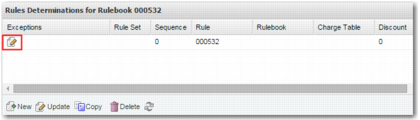
To view exceptions to a rule determination, click the edit icon in the relevant row in the Rule Determinations for Rulebook <RULEBOOK_NAME> grid.
Edit Icon for Exceptions to Rule Determinations
This action displays the Rule Determinations - Exceptions List pop-up window. To add an exception, click the Create button at the bottom of the window.
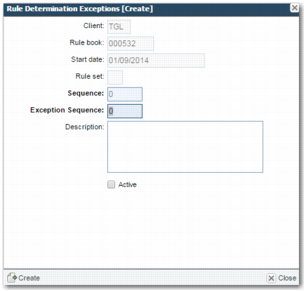
Rule Determination Exceptions [Create]
Client, Rule book, Start date, Rule set
These fields are read only, and depend on the rule.
Sequence
The sequence number determines the order in which the exceptions for this rule are checked.
Exception Sequence
The sequence number of the exception. Specify the sequence number of the rule determination that is the exception. Lower sequence numbers fire before higher numbers.
Description
An explanation of the exception.
Active
Select this field to enable the rule determination exception.