Scan, Pack and Ship
This section describes the administrator functions linked to Scan, Pack and Ship.
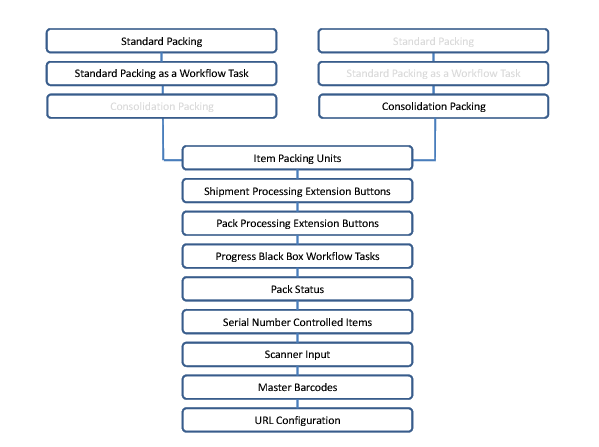
OverviewProvides an overview of packing using a Web browser and input device, explains the packing approaches available, and outlines a choice of reading paths.
Standard PackingLists the Standard Packing options in the Web UI and the steps for packing a shipment.
Standard Packing as a Workflow TaskExplains how to change a system value to run Standard Packing as a workflow task.
Consolidation PackingLists the Configuration Packing options in the Web UI and the steps for packing orders into consolidation shipments.
Item Packing UnitsExplains the different criteria you can apply to identify a packing unit.
Shipment Processing Extension ButtonsAdd shipment-level extension buttons to the Scan, Pack and Ship screen.
Pack Processing Extension ButtonsAdd pack-level extension buttons to the Scan, Pack and Ship screen.
Progress Black Box Workflow TasksConfigure event handling for response status codes returned by black box message requests.
Pack StatusSet up pack statuses.
Serial Number Controlled ItemsMaintain and troubleshoot serial numbers.
Scanner InputCapture packing information using a barcode scanner.
Master BarcodesLists typical master barcodes and shipment and pack-level extension buttons and the corresponding master barcode scans.
URL ConfigurationSet URLs for loading a transaction type automatically and for exiting Scan, Pack and Ship.
Overview
Scan, Pack and Ship enables the user to record packing information for a shipment and other Transport Management System (TMS) transactions through a Web browser. The supported browsers are listed in
Supported Browsers.
Supported Browsers
|
Browser
|
Versions
|
|
Internet Explorer
|
IE7, IE8, IE9
|
|
Firefox
|
3.6, 4
|
|
Safari
|
4
|
|
Chrome
|
16.0
|
Packing information can be captured using:
• Keyboard
• Mouse
• Electronic weighing scales
• Barcode scanner
Scan, Pack and Ship is highly configurable. Therefore, whatever way your organization approaches packing, you can configure the system to meet your needs. There are three configurable approaches for recording packing information.
Packing Approaches
|
Approach
|
Features
|
|
Standard Packing
|
In Standard Packing mode, you pack orders that are already part of a shipment. You can also add buttons to allow you to perform other operations on the shipment.
|
|
Standard Packing Workflow Task
|
In Standard Packing as a workflow task, you pack orders that are already part of a shipment. In the workflow pop-up, you can perform the packing operation on a single shipment only. No other operations on the shipment are allowed.
|
|
Consolidation Packing
|
In Consolidation Packing mode, you pack orders that are not already part of a shipment. You add the orders to a new or existing shipment as you pack them. You can also add buttons to allow you to perform other operations on the shipment.
|
Before configuring the Scan, Pack and Ship functionality, it is recommended that you read the packing chapters in Base Web UI User Guide. The user guide describes the packing functionality from a user perspective and provides more information on the differences between the packing approaches. In addition, a full list of the system values you need to configure your system are available in the document Appendix A. Both these documents are available in the QAD Document Library.
Reading Paths: Standard or Consolidation Packing displays the sections of this document that you should read, depending on the packing approach that your organization wants to implement.
Reading Paths: Standard or Consolidation Packing