Translating Web UI Literals
When you have created a language, you can log in to the Web UI using this language and update the translations of literals. When a translation administrator logs in, a translate button displays on pages that offer the translation functionality, as shown in
Translate Button on Scan, Pack and Ship Screen and
Translate Button on Workflow Portal Screen.
Translate Button on Scan, Pack and Ship Screen
Translate Button on Workflow Portal Screen
Note: The translation functionality is being introduced gradually. Currently, the Login, Home, Inquiry, Desktop Shipping, and Cancel or Reprint Label screens do not support page-level translation. If a page does not display the translate button, then that page supports system-level translation only.
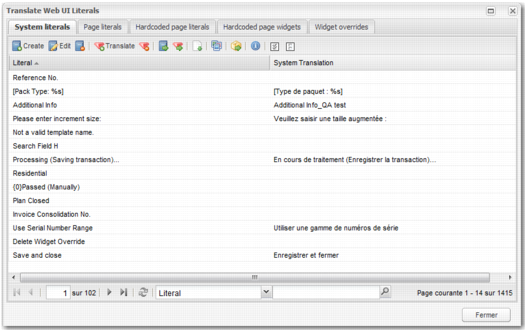
Click the Translate button to open the Translate Web UI Literals window.
Translate Web UI Literals
Depending on the contents of the TRANSLATION_ADMIN_ROLE system value described in
System Values Related to Translations, up to five tabs can be displayed in this window.
• If TRANSLATION_ADMIN_ROLE is set to GLOBAL_TRANSLATE _USER, only the System literals tab appears.
• If TRANSLATION_ADMIN_ROLE is set to PAGE_TRANSLATE _USER, the System literals and Page literals tabs appear.