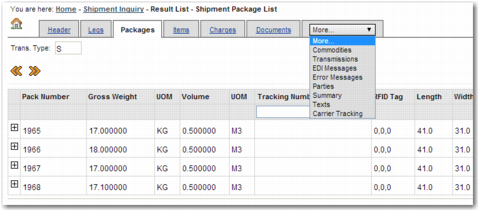
Section | Information Displayed |
Header | General information about the shipment, including Ship From and Ship To details. |
Legs | Individual stages along the shipment route, including the place of loading and place of destination. |
Packages | Individual packages within the shipment, including the pack number and RFID tag. |
Items | Individual items within the shipment, including the PO number and order line number. |
Charges | Charges attached to the shipment, including the currency and the associated line item. |
Documents | Documents associated with the shipment, including the document type and the number of times the document was printed. |
Commodities | Commodities within the shipment, including the gross weight and quantity. |
Transmissions | Transmissions related to the shipment, including transmission dates and numbers. |
EDI Messages | Electronic Data Interchange (EDI) messages related to the shipment, including the message status and message reference number. |
Error Messages | Error messages associated with the shipment, including the error code, and whether or not the error was overridden. |
Parties | Parties involved in the shipment, including the consignor and the consignee. |
Summary | A summary of the shipment, including the place of loading and place of destination. |
Texts | Text associated with the shipment. |
Carrier Tracking | Carrier tracking information from the PRECISION Exception Management (PEM) engine. This tab also displays general package information, package tracking history, and PEM comments associated with the package. |