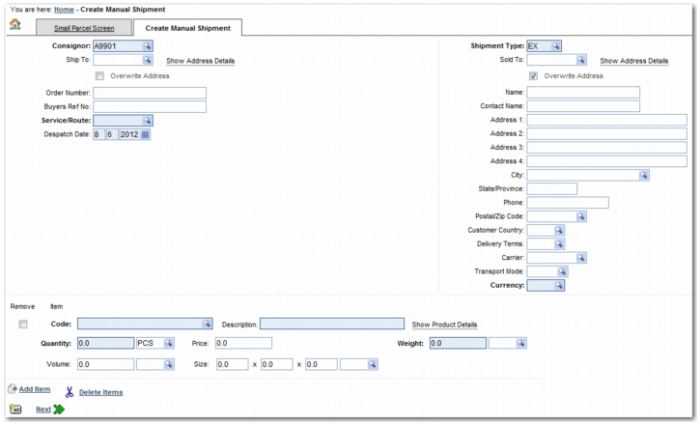
Field | Explanation |
Consignor | The person or company shown on the bill of lading as the shipper. |
Ship To | The address that the shipment is being sent to. To display the address, click Show Address Details. Select the Overwrite Address field if you want to amend the address. |
Overwrite Address | Select this field if you want to update the address that the shipment is being sent to. |
Consignee | The consignee’s company name. This field only appears if you have selected the Overwrite Address field below the Ship To field. |
Contact | A contact name within the Consignee company. This field only appears if you have selected the Overwrite Address field below the Ship To field. |
Address 1 | The first line of the customer address. This field only appears if you have selected the Overwrite Address field below the Ship To field. |
Address 2 | The second line of the customer address. This field only appears if you have selected the Overwrite Address field below the Ship To field. |
Address 3 | The third line of the customer address. This field only appears if you have selected the Overwrite Address field below the Ship To field. |
Address 4 | The fourth line of the customer address. This field only appears if you have selected the Overwrite Address field below the Ship To field. |
City | The city in which the consignee is based. This field only appears if you have selected the Overwrite Address field below the Ship To field. |
State/Province | The state or province in which the consignee is based. This field only appears if you have selected the Overwrite Address field below the Ship To field. |
Phone | The consignee telephone number. This field only appears if you have selected the Overwrite Address field below the Ship To field. |
Postal/Zip Code | The consignee postal or ZIP code. This field only appears if you have selected the Overwrite Address field below the Ship To field. |
Consignee Country | The country in which the consignee is based. This field only appears if you have selected the Overwrite Address field below the Ship To field. |
Order Number | The order number attached to the shipment. |
Buyers Ref No | The reference number of the buyer. |
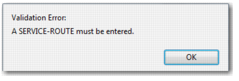
Service/Route | The service or route by which the shipment is to be sent. |
Despatch Date | The date when the shipment is to be despatched. |
Shipment Type | The type of shipment; for example, an export shipment. |
Sold To | The company code for the customer who bought the shipment. To display the address, click Show Address Details. Select the Overwrite Address field if you want to amend the address. |
Overwrite Address | Select this field if you want to update the address of the company that bought the shipment. |
Name | The name of the customer’s company. This field only appears if you have selected the Overwrite Address field below the Sold To field. |
Contact Name | A contact name within the customer company. This field only appears if you have selected the Overwrite Address field below the Sold To field. |
Address 1 | The first line of the customer address. This field only appears if you have selected the Overwrite Address field below the Sold To field. |
Address 2 | The second line of the customer address. This field only appears if you have selected the Overwrite Address field below the Sold To field. |
Address 3 | The third line of the customer address. This field only appears if you have selected the Overwrite Address field below the Sold To field. |
Address 4 | The fourth line of the customer address. This field only appears if you have selected the Overwrite Address field below the Sold To field. |
City | The city in which the customer is based. This field only appears if you have selected the Overwrite Address field below the Sold To field. |
State/Province | The state or province in which the customer is based. This field only appears if you have selected the Overwrite Address field below the Sold To field. |
Phone | The customer phone number. This field only appears if you have selected the Overwrite Address field below the Sold To field. |
Postal/Zip Code | The customer postal or ZIP code. This field only appears if you have selected the Overwrite Address field below the Sold To field. |
Customer Country | The country in which the customer is based. This field only appears if you have selected the Overwrite Address field below the Sold To field. |
Delivery Terms | Terms attached to the shipment’s delivery; for example, Delivery Duty Paid. |
Carrier | The company transporting the shipment. |
Transport Mode | The mode of transport; for example, by air or sea. |
Currency | The currency in which the shipping transaction is being conducted. |
Field | Explanation |
Code | The product code for the items. |
Description | A description of the product being shipped. Click Show Product Details to display details of the product. |
Quantity | The number of units in the line item. Use the lookup field next to the Quantity field to specify the unit of measure (UOM). |
Price | The cost of the items. |
Weight | The weight of the line item. Use the lookup field next to the Weight field to specify the UOM. |
Volume | The volume of the line item. Use the lookup field next to the Volume field to specify the UOM. |
Size | Specify the size of the line item in terms of length, width, and height. Use the lookup field next to the Size field to specify the UOM. |
 icon to clear all fields.