Data Integrity Check
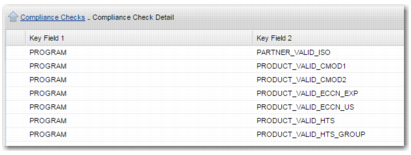
Data integrity is a list of compliance checks that are delivered as standard compliance checks in the PRECISION system. The purpose of the data integrity checks is to validate certain data elements on a transaction. There are currently seven individual checks delivered, as displayed in
Compliance Check Detail: Data Integrity Checks.
Compliance Check Detail: Data Integrity Checks
• PARTNER_VALID_ISO checks that the country code associated with each partner on a transaction is a valid code.
• PARTNER_VALID_CMOD1 checks that the export commodity codes on each of the item lines is valid.
• PARTNER_VALID_CMOD2 checks that the import commodity codes on each of the item lines is valid.
• PRODUCT_VALID_ECCN_EXP checks that the ECCN export code (associated with the country of origin on the transaction) on each item line is non-blank and valid.
• PRODUCT_VALID_ECCN_US checks that the US ECCN code on each item line is non-blank and valid.
• PRODUCT_VALID_HTS checks that the import and export group commodity codes on each item line are valid.
• PRODUCT_VALID_HTSGROUP checks that the import and export group commodity groups on each item line are valid.
To view the data integrity checks in the system:
1 Open option CK.
2 Select the DATA-INTEG check and choose the sub-option Compliance Check Detail.
3 Delete any check that you do not want to run from the list.
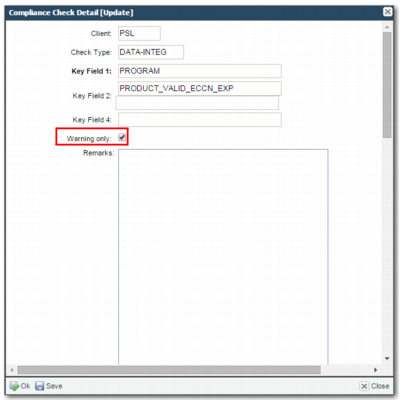
Data Integrity – Pass with Warning
It is possible to have more than one data integrity check, allowing you to set up and run different lists of checks. For example, you may have different checks, depending on whether the transaction is export or domestic.
For the data integrity check to run, the data integrity check code must exist in the DATA INTEGRITY CHECKS system value, as displayed in
Data Integrity Values.
Data Integrity Values
Category | Key | Possible Values |
COMPLIANCE | DATA-INTEGRITY CHECKS | A comma-separated list of data integrity codes that exist in the CK option such as DATA-INTEG,DOM-DI. |