Run Compliance Task
The Run Compliance task is displayed in the tasks area of the Workflow Portal. You can run this task by double-clicking it. When a green check mark is subsequently displayed, it indicates that compliance has run successfully.
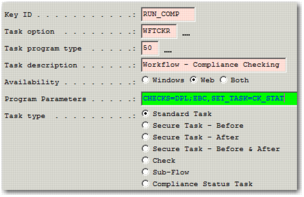
To enable a user to run compliance in workflow, make a Run Compliance task available. You can configure this task from the WFWT suboption of Workflow Maintenance (WF), as shown in
Run Compliance Task Settings.
Run Compliance Task Settings
Key ID
Enter a unique code for the task; for example, RUN_COMP. This field is mandatory.
Task Option
Set to WFTCKR. This field is mandatory.
Task Program Type
Set to 50. This field is mandatory.
Task Description
Enter a meaningful description for this task. This text is the description the user sees for this task on the Workflow Portal.
Availability
Set to Web. This field is mandatory.
Program Parameters
There are two parameters for this task:
• CHECKS=<CHECK_LIST>. A semi-colon separated list of compliance checks you want to run. The possible checks are listed in option CK. For example, to set the Run Compliance task to run the Denied Party List and Embargoed Countries checks, set this parameter to DPL;EBC.
This parameter is mandatory.
• SET_TASK=<TASK_ID>. This parameter is used to update the Compliance Status task on the Workflow with the results of the compliance checks. Set <TASK_ID> to the Key ID of the task that you want to update. For example, when the Key ID of the Compliance Status workflow task is CS_STAT, specify SET_TASK=CK_STAT.
Task Type
Set to Standard Task.
Note: The status of this task reflects whether the system was able to run this workflow task successfully; it is not related to the result of the compliance check.