Compliance Results
The Compliance Results task enables you to open the Compliance Results screen and view the compliance results. You cannot open compliance results until compliance has been run on a transaction at least once.
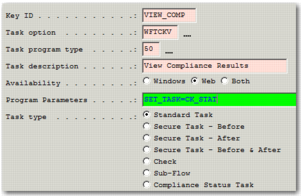
The task can be configured as follows from the WFWT suboption of Workflow Maintenance (WF), see screen in
Compliance Results Task Settings.
Compliance Results Task Settings
Key ID
This code is a unique code for the task; for example, VIEW_COMP. This field is mandatory.
Task Option
Set to WFTCKV. This field is mandatory.
Task Program Type
Set to 50. This field is mandatory.
Task Description.
Enter a description for this task; for example, View Compliance Results. The user sees this description of the task in the Workflow Portal.
Availability
Select Web. This field is mandatory.
Program Parameters
There is one parameter that can be used for this task:
• SET_TASK=<TASK_ID>. This parameter is used to update a compliance status task on the Workflow with the results of the Compliance checks when Recheck or Recheck All options are used on the results screen. Set TASK_ID = "Key ID" for the status task to be updated. This parameter is optional. However, when not configured, the compliance status task is not updated when compliance results change.
Task type
Set to Standard Task.
Note: The status of this task reflects whether the system was able to run this workflow task successfully; it is not related to the result of the compliance check.