Compliance Status Task
The Compliance Status task is usually displayed in the Tasks area, although it is not interactive. It simply displays the current compliance status of the transaction.
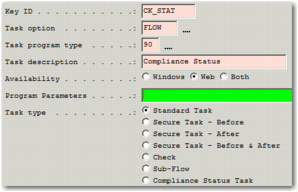
The status of this task is updated when compliance checking is run from a run compliance workflow task or from the compliance results screen. The task can be configured from the WFWT sub-option of Workflow Maintenance (WF), as shown in
FLOW Settings.
FLOW Settings
Key ID
Enter a unique code for the task; for example, COMP_STAT. This field is mandatory.
Task Option
Set to FLOW. This field is mandatory.
Task Program Type
Set to 90. This field is mandatory.
Task Description
Enter a description for this task; for example, Compliance Status. Enter a description that the user sees for this task on the Workflow Portal.
Availability
Set to Web. This field is mandatory.
Program Parameters
Leave this field blank.
Task Type
Set to Standard Task.
Note: The option Compliance Status Task is for future use.
System Values Related to Compliance Status Task
Category | Keyword | Value |
COMPLIANCE | WORKFLOW STATUS | The task ID of the Compliance Workflow status used on transactions. This system value is used when the compliance status changes due to the Compliance Results screen being accessed outside of Workflow. It ensures that the Compliance Status Workflow task displays the current compliance status. |