E-mails
You can configure the system to send an e-mail when you:
• Run a compliance workflow task.
• Click the Recheck or Recheck All buttons on the Compliance Results screen.
• Manually override a check on the Compliance Results screen.
To configure an e-mail for a particular check type:
1 Open option CK.
2 Select the check type that you want to trigger an e-mail for.
3 In the sub-options, select Compliance Notify Contacts.
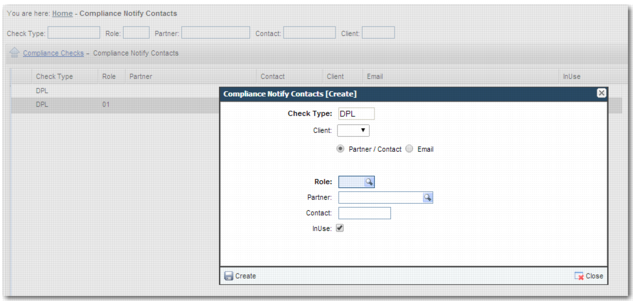
4 Create a record.
Compliance Notify Contacts
Check Type
The check type cannot be changed.
Client
Set up the rule for all clients by leaving this blank. If you select a client, the rule applies only for that client.
Partner/Content
When you select this option, complete the fields to specify the recipient of the e-mail. The system sends an e-mail to the specified role, partner, or contact when an e-mail address exists for this party.
Email
When you select this option, an Email field is displayed where you can enter a specific e-mail address. You can only enter one e-mail address.
Role
Select a particular role to receive an e-mail when this check is run.
Partner
Select a particular partner to receive an e-mail when this check is run.
Contact
Enter a contact to receive an e-mail when this check is run. When the contact e-mail address is blank or when the contact cannot be found, the system uses the e-mail address associated with the partner. When the partner field is blank, the system looks for the partner associated with the role on the transaction and checks whether there is a contact e-mail address configured for that partner. Otherwise, the system sends an e-mail to the partner for the role type you have selected.
Note: Contacts are set up in option NR within the partner record.
In Use
Ensure that this field is selected to activate the rule.
Note: You can configure the same user to receive an e-mail for multiple checks. When multiple checks fail, the user only receives one e-mail.