DPL & Embargoed Country Checking
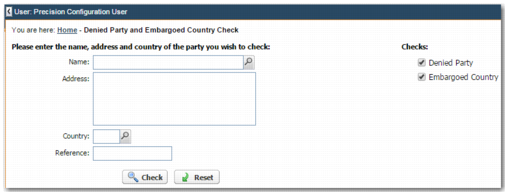
The DPL & Embargoed Country Checking menu option allows you to run one-off DPL and EBC checks on names and addresses. To open DPL & Embargoed Country Checking, on the left menu, choose Trade Compliance|DPL & Embargoed Country Checking.
Denied Party and Embargoed Country Check Ad Hoc Search
Complete the appropriate fields.
Name, Address, Country
The name, address, and country code that you want to run checks on. The Name field is mandatory.
Reference
Add a unique reference number that you can use in the future to search for the results.
Use the Checks section to specify whether you want to run the Denied Party check, the Embargoed Country check, or both. To run the chosen compliance checks, click Check.
The Compliance Results screen is then displayed, containing the results of the Denied Party and Embargoed Country check. For details on the Compliance Results screen, see
Compliance Results.