Compliance Results
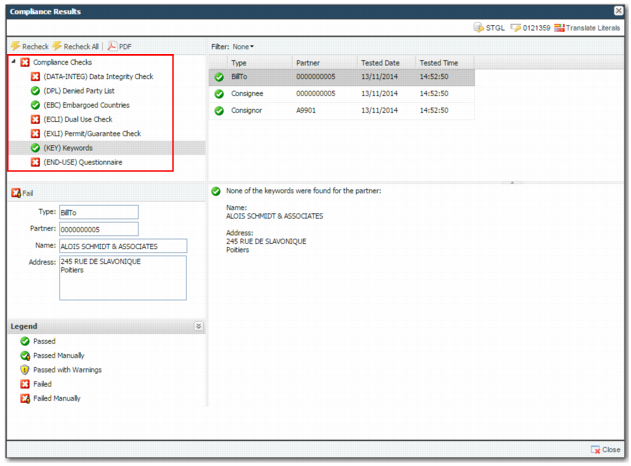
The Compliance Results screen enables you—based on authority—to view and manage compliance results. If compliance has run multiple times for the same transaction, you can also view the previous results. It displays the results of each individual check performed; for example, Denied Party List and Embargoed Country screening.
Note: You can access the screen from:
• Compliance History Search
• Workflow Portal
• A URL link embedded in notification e-mails
• A URL link included in the Data Scrub results file
• DPL & Embargoed Country Checking menu option
Compliance Results Screen displays compliance checks for a shipment of cameras from the US to France.
Compliance Results Screen
The overall compliance status and the status of each individual check are displayed.
The overall compliance status is only set to pass when all individual checks pass. If any check fails, the overall status is failure. The following table shows a list of possible compliance statuses:
Possible Check Statuses
Icon | Check Status | Explanation |
| Passed | The compliance check passed. |
| Passed Manually | The compliance check failed and a user with relevant permissions has manually passed the check. |
| Passed with Warnings | The compliance check passed but was flagged with a warning. |
| Failed | The compliance check failed. |
| Failed Manually | The compliance check status was set to Failed by a user with the relevant permissions. |