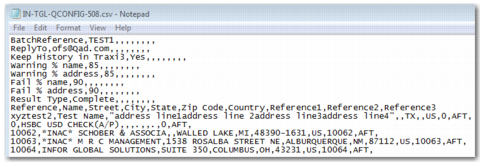
Line | Purpose |
Batch reference | A unique identifier for the data scrub. Change this number each time that you run a DPL data scrub. The reference number is not checked when the data scrub is run; it is your responsibility to change this number for each upload. Example: BatchReference,ref11114 |
ReplyTo | Send the results of the data scrub to the e-mail address specified. You can enter multiple e-mail addresses in a comma-separated list. Example: ReplyTo,[email protected],[email protected] |
Keep History in TRAXi3 | This value informs the system whether a partner master record is created for each name and address checked. The partner is required when you want to use white-listing. The possible values are Yes or No. |
Warning % name | The percentage match threshold above which you want the name check to pass with a warning. This value is used in conjunction with the Fail % name setting. Example: Warning % name,60 |
Warning % address | The percentage match threshold above which you want the address check to pass with a warning. This value is used in conjunction with the Fail % address setting. Example: Warning % address,50 |
Fail % name | The percentage match threshold above which you want the name check to fail. This value should always be higher than the Warning % name. Example: Fail % name,85 |
Fail % address | The percentage match threshold above which you want the address check to fail. This value should always be higher than the Warning % address. Example: Fail % address,75 |
Result Type | The results of the data scrub are saved in an output file that you can download. To specify whether you want the data scrub results to be in a summarized or more detailed format, choose either Brief or Complete as the value of this field. Complete means that the result file contains more information on the matches, apart from the name and the result. The Brief setting only returns the name and the result of the check. For more information on the contents of the brief and complete versions of the output file, see Output File Content. |
Address Headings | This line includes the address headings that appear in columns in the results output file. This line is always: Reference,Name,Street,City,State/Province,Zip/Postal Code,Country,Additional Reference 1,Additional Reference 2,Additional Reference 3 |
Address details | There can be multiple address details lines in the CSV file. Each of these address lines is checked against the DPL when the batch DPL data scrub is run. Example: 1,John Doe,"PRECISION SOFTWARE, 412 Drachman Suite SA, Tucson AZ 832354",,,,US,,, |