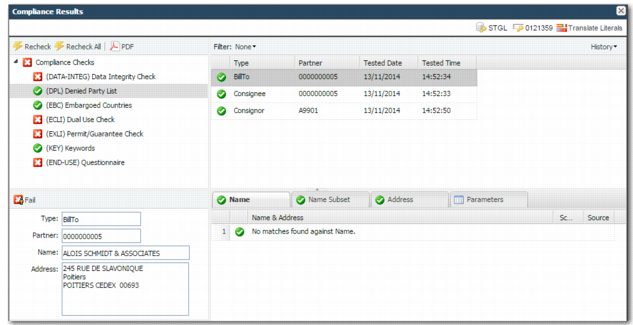
Denied Party List Check
The Denied Party List (DPL) check compares the names and addresses on the transaction against the lists of denied and restricted parties in the system. When a name or address has a configured percentage of similarity to a denied party, a warning is produced. When the similarity reaches a certain configured threshold, a failure results. The list of denied and restricted parties in the system can be a combination of lists that Precision has sourced and provided as content, and entries that your company maintains.
You can configure the list of parties checked and the check parameters. For further information, see
Administration Guide: Compliance. In
Denied Party Check, the check runs on the bill-to, the consignee, and the consignor.
Denied Party Check
The screening results for each party are displayed and a failure of any party causes the overall DPL check to be a failure.
Each time you select a party from the list, the associated address of that party is displayed in the left pane. Below the party list, the details of the checks are displayed. There are four tabs. Each tab displays a status icon. A green check mark indicates success and a red x indicates a failure to be reviewed.
Note: When you run a DPL check on a partner, the result is stored—cached—behind the partner. If you manually override the result, you must click Recheck All to rerun compliance on the partner. Otherwise, the cached value behind the partner is taken when the cached value is part of the system parameter USE CACHED DPL RESULTS.
If a new content pack has been uploaded since the last time a DPL check was run on a partner, the system always reruns compliance on the partner.
• The Name tab displays details of the check against the party name. The name check fails when the percentage returned from any of the matches in the DPL algorithm exceeds the name failure threshold parameter level. For example, when a name is an 85% match or more with a denied party name and the threshold for a match is 80%, the check fails.
• The Name Subset tab displays details of the check against the party name. This check means that when the name you are checking is a subset of any denied party, the check fails. This always returns a 100% match. This check may be disabled in your company.
• The Address tab displays details of the check against the party address. The Address check fails when the percentage returned from any of the matches in the DPL algorithm exceeds the address failure threshold parameter level.
• The Parameters tab displays the system configuration related to Denied Party screening.