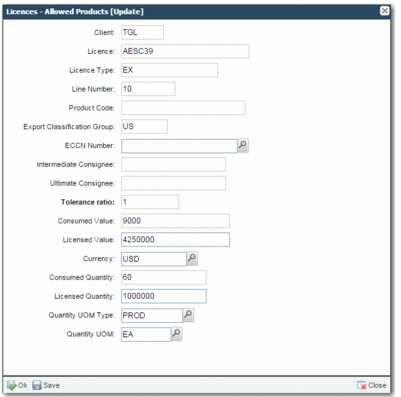
XL Sub-option (Licenses - Allowed Products)
This option allows you to specify the products or ECCNs and the maximum values and quantities that can be used with the license. Select the license you created, and from the sub-options, select Licenses - Allowed Products. To specify allowed products, click Create.
The Licenses - Allowed Products Create form contains the following fields, many of which are read-only and default from the main option:
Client
This field is read-only and defaults from the license.
License
This field is read-only and defaults from the license.
License Type
This field is read-only and defaults from the license.
Product Code
If the license is issued for a particular product, enter the product code in this field.
Export Classification Group
This field is read-only and defaults from the license.
ECCN Number
If the license is issued for a particular ECCN number, enter the ECCN number in this field.
Intermediate Consignee/Ultimate Consignee
These fields are read-only and default from the license.
Tolerance ratio
This field is for future use.
Consumed Value
This field displays the total value of all transactions made against this license line. This field is read-only.
Licensed Value
If the license is issued for a particular value, enter the value in this field.
Currency
This field contains the currency of the license value.
Consumed Quantity
This field is the total quantity of items from all transactions made against this license line. This field is read-only.
Licensed Quantity
If the license is issued for a particular quantity, enter the quantity in this field.
Quantity UOM Type
This field contains the unit of measure type; for example, MASS, VOLUME, PROD.
Quantity UOM
This field contains the unit of measure associated with the license quantity; for example, Each, KG.
Licenses - Allowed Products
If the license covers multiple products or ECCNs, create multiple records.