Adding a Permit/Guarantee
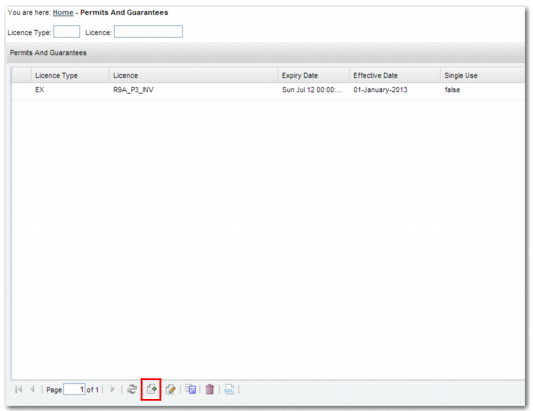
Using the QuickPath option XG, you can set up licenses for use with the Permit/Guarantee check, as displayed in
License Maintenance Panel. To create a new permit or guarantee, click Create.
Permits and Guarantees
The more fields you complete on the Permits and Guarantees Maintenance Create form, the narrower the application of this particular permit or guarantee.
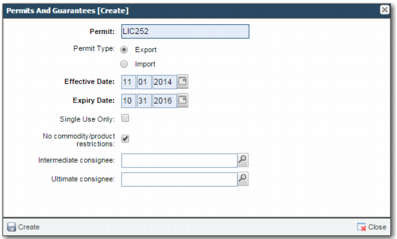
Permits and Guarantees Create
Permit
Enter the permit or guarantee number associated with the permit or guarantee. This field is mandatory.
Permit Type
Select Export or Import.
Effective Date
This field contains the effective date of the permit or guarantee. The field is mandatory.
Expiry Date
This field contains the expiry date of the permit or guarantee. The field is mandatory.
Single Use Only
When selected, you can use this permit or guarantee for one shipment only, regardless of whether the shipment uses the full permit or guarantee quantity or value.
No commodity/product restrictions
When you select this field, quantities and values are ignored and only the date range is considered. In addition, no XG sub-option is available.
Intermediate Consignee
Enter an intermediate consignee to whom this license applies. The name must match the details on the license.
Ultimate Consignee
Enter an ultimate consignee. The ultimate consignee receives the goods at their final destination. The name must match the details on the license.