Shipment Workflow
The workflows for shipping a PRECISION network parcel shipment and a non-integrated TL/LTL shipment require different configuration. However, the basic workflow is similar.
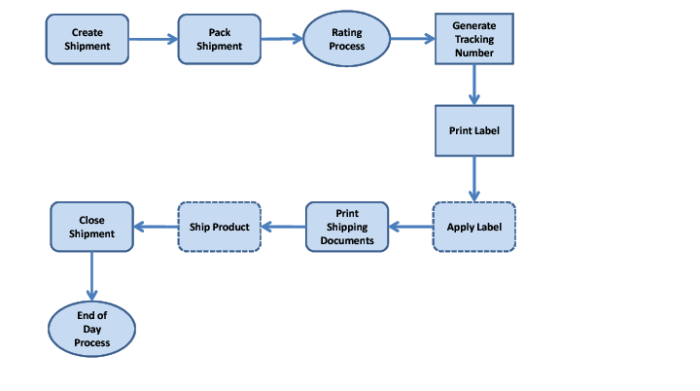
Typical Shipment Workflow displays a typical shipment workflow.
Typical Shipment Workflow
Creating
A TMS shipment can be created in one of the following ways:
• The shipment is interfaced from an ERP system, such as QAD.
• The shipment is created through an SOA message.
• A user creates the shipment through the Web or Windows UI.
All shipments have the same database structure.
Packing
Individual shipment item lines are explicitly associated with particular packages. This association ensures that the program logic can determine the breakdown of a shipment into individual packages.
Note: Packing is not covered in this guide. For more details on packing, see Base Web UI User Guide and Base Web UI Administration Guide.
Rating
For PRECISION network carriers, each carrier has its own rating engine and its own prescribed rate structure.
For TL/LTL carriers, the rating process calculates the rates using one of two engines available for TL/LTL carriers. When the shipment is rated, the relevant rating engine is called and the estimated costs are generated for association with the shipment. These costs are calculated according to the characteristics of the shipment being processed, and based on the rate structure defined for the carrier service.
Note: If you subsequently need to stop the shipment from being shipped, you can void the shipment. For more details, see
TMS Workflow Tasks.
Generating Tracking Numbers and Labels
For PRECISION network carriers, tracking numbers and labels are generated automatically in carrier-approved formats. Most carriers track at a package level and tracking numbers are unique for each package. However, some carriers still track at shipment level and the tracking number is the same for each package on the shipment.
For TL/LTL carriers, the process to set up tracking numbers must be configured for each carrier. You can use a generic label supplied with PRECISION or create a label for a particular carrier. When configured, tracking numbers and labels are assigned and printed for the shipment in the same way as for PRECISION network carriers. Not all TL/LTL carriers use tracking numbers or labels.
Printing Documents
PRECISION network carriers have specific documents that you must print in carrier-approved format. For TL/LTL carriers, the documentation requirements vary. You may also decide to print some documents for your own purposes.
Note: Documents are not covered in this guide. For more details on documents, see Topic 025 on the QAD Document Library in QAD Transportation Management|PRECISION Reference Guides|Base.
Closing Shipments
You can set a shipment to close automatically or it can be a manual process.
EOD (End of Day or End of Batch)
At a particular time during a shipping day, a carrier or carriers collect the shipments ready for shipping. To make a shipment ready for shipping, the user adds it to an EOD Manifest, which is created based on carrier, Packing Location, or other criteria. The EOD screen in the Web UI enables you to select the batch of shipments for collection. For most carriers in the PRECISION network, an electronic manifest file is generated and communicated to the carrier. The system can also generate a paper manifest when required by the carrier.
When the packages or shipments leave your Packing Location, they enter the carrier network. You can use Package Exception Management (PEM) to track your packages and shipments. For more details, see Package Exception Management Administration Guide and Package Exception Management User Guide.