Charge/Revenue
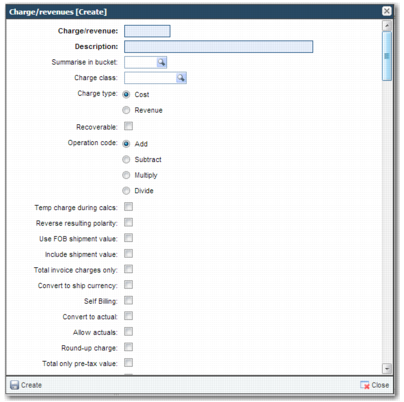
The CH option enables you to create cost types, as displayed in
Charge/revenue.
Charge/revenue
The following fields are available when creating a new charge:
Charge/revenue
Enter a Charge/revenue code of up to six characters. This field is mandatory.
Description
Enter a meaningful description of the purpose of the cost type. This field is mandatory.
Summarise in bucket
Use the lookup to choose a Summary Bucket to categorize the charge type for printing at the foot of certain invoices. Create Summary Buckets in option Y5.
Charge Class
Use this field to group charges together. It can be used when interfacing back from PRECISION to a sales order system to update financial accounts. You create Charge Class categories in option GC.
Charge Type
Select whether the charge is a cost or revenue.
Recoverable/Operation Code
Available for future use.
Temp charge during calcs
If the calculation applies a temporary charge until calculation is complete, select this field.
Reversing resulting polarity/Use FOB shipment value/Include shipment value/Total invoice charges only
Available for future use.
Convert to ship currency
When selected, during the charge calculation, the calculated charge stored into the database is converted to the currency in the shipment header.
Self Billing/Convert to actual/Allow actuals
Available for future use.
Round-up charge
Available for future use.
Total only pre-tax value/Customs Clearance/Additional flag 23, 24, 25
Available for future use.
Delivery terms 1-9
Delivery Terms—or INCOTERMS—are internationally recognized codes that indicate who pays for delivery of goods. If the shipment delivery term matches the value in one of these fields, the charge is flagged as invoiceable.
User defined 01 to 20
Available for future use.
Tax Type
If tax is calculated for the charge, specify a tax type.
Allocate method
If the charge cost is calculated over a group of shipments, the charge is split over the shipments. Use this field when load building. Creating a load of more than one shipment enables you to find the cheapest rate per shipment.
Allow Allocations
Available for future use.
P&L Summary Group/B/L Summary Group/Invoice Summary Group
Available for future use.
Prt B/L
Available for future use.
Prt on Inv
To print the charge on the invoice, select this field.
Sum. on B/L/Sum on Inv/Cost bucket
Available for future use.
Agent split/EDI code/Supplier Type/Use the maximum ship rate
Available for future use.
Charge category
To categorize the charge, use the lookup to choose a charge/revenue group. A charge/revenue category groups charges by their type. You create charge/revenue categories in option CG.
User Defined 1-5
These fields are available for future use.
Service Type
To indicate the service type for the charge being maintained, select a service type. For more information on service types, see Transportation Management System User Guide.
Landed cost allocate method
If required, indicate the method to use for landed cost allocation.