Formatting Rates Files
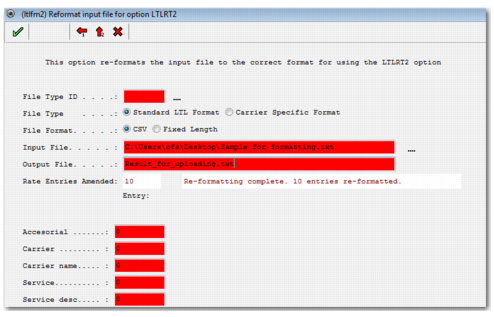
If the LTL rates files provided by the carrier are not in the required format, you must map the columns in the Excel/CSV/Fixed length file to the required format using LTLFM2, as displayed in
LTFM2.
LTFM2
File Type ID
This field enables you to choose an ID for the file to be formatted. The file type is saved in a VALUESTORE category system value. If the same file type is specified in the future, the other field values can be retrieved to the screen automatically. For example, when you specify a file type as ROADWAY, any ROADWAY file you format in the future will populate this screen with the same values used to format it previously.
File Type
Choose Standard LTL Format or Carrier Specific Format.
File Format
Depending on the format you choose, the screen layout changes accordingly. If you choose CSV, all fields that can possibly appear in the file are displayed on the LTLFM2 screen as entry numbers within the comma-separated file. When the value entered in a field is zero, it is ignored.
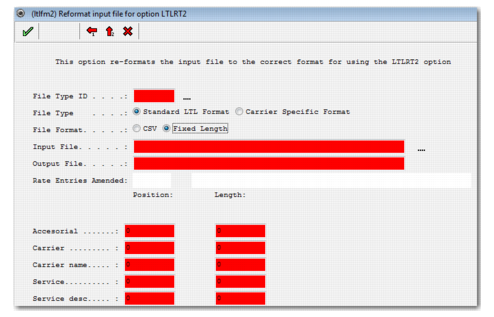
If you choose Fixed Length, all fields that can possibly be present in the file are displayed on the LTLFM2 screen as start positions with a specified field length, as displayed in
LTFM2 Fixed Length Option. The position indicates where in the fixed length text file the field begins. The length specifies the number of characters to be read for that field.
LTFM2 Fixed Length Option
Input File
Enter the location and name of the carrier rates file to format for upload.
Output File
Enter the name of the resulting formatted file to be created in the PRECISION format for subsequent upload.
Rate Entries Amended
This field displays the results when you format a file, as displayed in
LTFM2.
The following fields are possible entries in the carrier rates file to be formatted. Depending on the File Format you select, include either the Entry number or the Position/Length corresponding to the field in the carrier rates file on the LTLFM2 screen. If no corresponding field is included in the carrier rates file to be formatted, leave the Entry number or Position/Length as 0, which means it is ignored.
Accessorial
Determines whether the charge is an accessorial. This is typically a Y or N indicator in the carrier rates file.
Carrier
Carrier Standard Carrier Alpha Code (SCAC) code or other Carrier ID in the carrier rates file.
Carrier name
Carrier name.
Service
Service ID.
Service desc
Service description.
Transport mode
Mode of transport.
Rate basis
The rate basis that applies to the service; for example, Mileage or Gross Weight.
Region from, Region from2
The starting origin zip code for which the rate applies. If it is a range, also enter the end origin zip code.
Shipper ctry, State, City
The origin country, state, and city for which the rates apply.
Region to, Region to2
The destination zip code for which the rates apply. If it is a range, enter the ending zip.
Ship to ctry, State, City
The destination country, state, and city for which the rates apply.
Effective date, Expire date
The date when the rates become effective, and the date on which the rates expire.
From Class, To Class
The Freight class or range of Freight classes to which these rates apply.
Rate Freight Class
The Rate Freight class to which these rates apply. For example, a carrier may issue a range of freight classes (as included in the From Freight Class/To Freight Class elements), which are to be treated as another freight class for rating purposes. For example, from class 50 to class 125, rate these all at the freight associated with class 150. Therefore, in this example, the Rate Freight Class is 150.
Pack type
The pack type to which the rates apply when the Rate Basis is a package-related basis—Packs, Containers, Inners, or Outers.
Break from, Break to
The starting and ending break points for which the rates apply.
Break UOM
The UOM that applies to the breaks.
Rates UOM
The UOM that applies to the rates.
Freight Class
The freight class for which these rates apply.
Divisor
The divisor for the rates used to decimalize the rates provided.
Amount
The rate per unit that applies to these rates.
Fix amount
The fixed amount that applies to these rates.
Minimum
The minimum charge for these rates. When the calculated charge—based on Rate per Unit and/or Fixed Amount—is less than the Minimum charge, the Minimum charge is used instead.
Discount Rate id
Use this field if the carrier rate file being formatted is for a service which is discounted off existing Czar Lite or Yellow Freight baseline rates—available through SMC integration. Identify the Entry number or Position/Length where the ID of the Czar Lite/Yellow Freight rate ID is located in the carrier rate file.
Discount
The percentage of discount to apply to the rates calculated from the Discount Rate ID.
Discount floor
The lowest amount to apply to the rates after a discount is applied.
Currency
The rate currency.
One way
Determines whether the charge applies only to a one-way zone or also to the reverse of the Shipper/ShipTo zone. This setting is typically a Y or N flag in the carrier rates file.
Preferred
Determines whether the Service should be flagged as a Preferred Carrier. This setting is typically a Y or N flag in the carrier rates file.
Min Weight
The minimum weight allowed for the service.
Max Weight
The maximum weight allowed for the service.
Check next tier
Determines whether the next highest weight break should be checked for a lower rate. This setting is typically a Y or N flag in the carrier rates file.