Formatting Transit Time Files
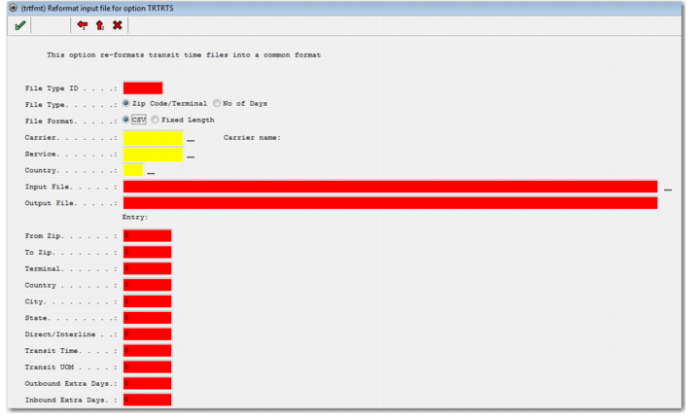
Before you load transit time files provided by the carrier into PRECISION, format them using the Windows UI option TRTFMT, as displayed in
TRTFMT.
TRTFMT
File Type
Transit time information can be provided by a carrier in two files. The first file contains a list of zip codes and the carrier terminal or hub that services them. The second file contains a From and To terminal and the number of days it takes to deliver from one to the other. Select whether you are formatting the Zip Code/Terminal file or the No of Days file. The fields displayed then vary, depending on whether the Zip Code/Terminal file or the No of Days file is being formatted. If the carrier provides only one file, you need only format the Zip Codes/Terminal file.
File Format
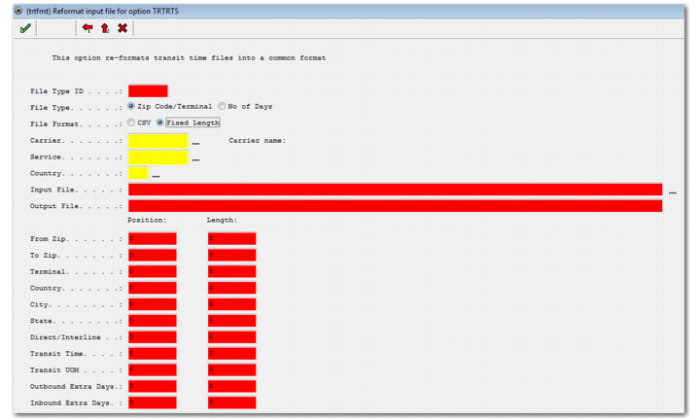
The carrier file can be in CSV or Fixed Length text format. Depending on the format you choose, the layout of the screen changes. If you choose CSV, all fields that can be present in the file are displayed as entry numbers within the comma-separated file. If you choose Fixed Length file format, all the fields that can appear in the file are displayed as start positions, with a specified field length, as displayed in
TRTFMT Fixed Length Option.
Carrier
Enter the carrier code.
Service
Enter the service code to which the transit time information is to be added. If this field is blank, the transit time information is added to all the services for the carrier entered in the previous field.
Country
Enter the origin country for which these transit times apply.
Input File
Specify the location of the file to be formatted.
Output File
Specify the location where the output file is to be placed after formatting.
TRTFMT Fixed Length Option
For CSV files, input the entry number of the field in the file. For fixed length files, enter the starting position and length of the field.
From Zip, To Zip
The origin zip code and the destination zip code to which the transit times apply.
Terminal
The identifier for the carrier terminal or hub within the transit time file.
Country, City, State
If these columns are in use, enter the relevant positions in these fields.
Direct/Interline
This field is currently not in use.
From Terminal, To Terminal
This field is displayed when the file type being formatted is No of Days. The field allows for identifying the location in the No of Days file for the From and To carrier terminals or hub IDs.
Transit Time
The number of units of transit time.
Transit UOM
The unit of measure of the transit time.
Outbound Extra Days, Inbound Extra Days
You can adjust the default transit time for a From/To Zone combination by adding extra days. The origin zone holds the number of outbound extra days and the destination zone holds the number of inbound extra days.
To process the file, click the green check mark.