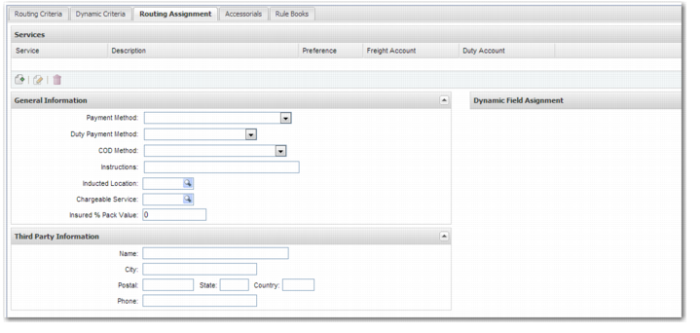
Routing Assignment Tab
The Routing Assignment tab is used to specify actions taken when a rule applies to a shipment. Use this tab to specify the services that are considered or selected for the purposes of:
• Route assignment
• Rate shopping
• Route validation
You can also use this tab to update shipment attributes such as the freight payment method.
Routing Assignment
Services
The Services section consists of a set of services, each with its own associated preference weighting and freight account. Use this section to add a list of services that are appropriate for shipments to which this rule applies, and to specify a freight account and duty account.
Service
The service code.
Description
The full name of the service.
Preference
The preference weighting that applies to the service. The preference weighting can be any number between 0 and 999. The preference weighting is taken into account when determining the service assigned to a shipment during Route Assignment. For more information, see
Determining the Preferred Service for the Shipment.
Freight Account
The freight account associated with the service. If the freight payment method is collect, this freight account is billed.
Duty Account
Specifies the duty account associated with the service. The duty account is only relevant if the duty payment method is Third Party.
General Information
Use this section to assign general information to shipments that this Routing Guide rule applies to.
Payment Method
Freight payment method.
Example: When shipping to a particular customer, shipments are billed as collect. Therefore, Collect is set as the freight payment method.
Duty Payment Method
Duty payment method.
Example: When shipping to a particular customer, shipments are to billed as Shipper Pays Duty + VAT.
COD Method
COD Payment Method.
Example: When the freight payment method is COD, the COD Payment Method is Cashiers Check.
Instructions
Instructions for the shipment, which are stored in the Rating Errors Log for the shipment and displayed on the Invalid Rates tab of the Rate Shop task.
Inducted Location
You can use the Routing Guide rule to specify the Shipper Account associated with the Shipment when a particular service is chosen. The Packing Location that you specify in this field determines the shipper account. For more about Packing Locations, see
Packing Locations.
Example: A shipper requires zone skipping of shipments. The Shipments are labeled with a shipping address that differs from the location where they are processed initially. The shipments are trucked to that shipping address and then handed over to the carrier linked to the service determined by the Routing Assignment.
Chargeable Service
The chargeable service of the shipment. A shipper can ship with one method and bill with another method. The rates applied to the customer are based on the chargeable service.
Insured % Pack Value
The percentage of the package value to apply as an insured value for the package. This value is used to notify the carrier how much the package is to be insured for when the service offers insurance as an accessorial.
Third Party Information
If you want to bill a third party for the freight costs of the shipment, use this tab to store the third-party details. This information is relevant only when the freight payment method is Third Party.
Name
The name of the third-party company to whom the freight is billed.
Addr1, Addr2, Addr3
If these fields display, then you can use them to enter details of the third-party address.
City, Postal, State, Country
The address of the third-party company to whom the freight is billed.
Phone
The contact number of the third-party company to whom the freight is billed.
Dynamic Field Assignment
This section is for future use.