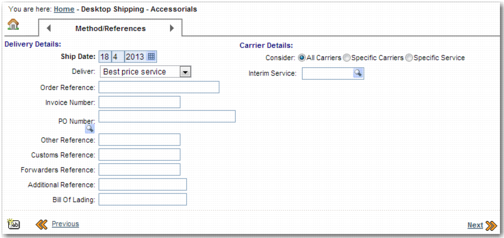
Category | Key | Description |
ITRAX | DTS ADDITIONAL REFERENCE | Determines whether the Additional Reference field appears on the Method/References step. It controls whether the field is mandatory or optional. You can choose to assign a domain for a lookup list. Format: show=<YES/NO>,req=<YES/NO>,domain=<DOMAIN>. Specify a domain using the appropriate lookup domain code from the User Defined Lookup Domain table accessed through the UY QuickPath option. Default value: show=yes,req=no,domain= For this value to work correctly, include the domain section of the value even when it is blank. |
ITRAX | DTS FORWARDER REFERENCE | Determines whether the Forwarders Reference field appears on the Method/References step or not. It controls whether the field is mandatory or optional. You can choose to assign a domain for a lookup list. Format: show=<YES/NO>,req=<YES/NO>,domain=<DOMAIN>. Specify a domain using the appropriate lookup domain code from the User Defined Lookup Domain table accessed through the UY QuickPath option. Default value: show=yes,req=no,domain= For this value to work correctly, include the domain section of the value even when it is blank. |
ITRAX | DTS CUSTOMER REFERENCE | Determines whether the Customs Reference field appears on the Method/References step. It controls whether the field is mandatory or optional. You can choose to assign a domain for a lookup list. Format: show=<YES/NO>,req=<YES/NO>,domain=<DOMAIN>. Specify a domain using the appropriate lookup domain code from the User Defined Lookup Domain table accessed through the UY QuickPath option. Default value: show=yes,req=no,domain= For this value to work correctly, include the domain section of the value even when it is blank. |
ITRAX | DTS OTHER REFERENCE | Determines whether the Other Reference field appears on the Method/References step. It controls whether the field is mandatory or optional. You can choose to assign a domain for a lookup list. Format: show=<YES/NO>,req=<YES/NO>,domain=<DOMAIN>. Specify a domain using the appropriate lookup domain code from the User Defined Lookup Domain table accessed through the UY QuickPath option. Default value: show=yes,req=no,domain= For this value to work correctly, include the domain section of the value even when it is blank. |
ITRAX | DTS PO NUMBER | Determines whether the PO Number field appears on the Method/References step. It controls whether the field is mandatory or optional. You can choose to assign a domain for a lookup list. Format: show=<YES/NO>,req=<YES/NO>,domain=<DOMAIN>. Specify a domain using the appropriate lookup domain code from the User Defined Lookup Domain table accessed through the UY QuickPath option. Default value: show=yes,req=no,domain= For this value to work correctly, include the domain section of the value even when it is blank. |
ITRAX | DTS INVOICE NUMBER | Determines whether the Invoice Number field appears on the Method/References step. It controls whether the field is mandatory or optional. You can choose to assign a domain for a lookup list. Format: show=<YES/NO>,req=<YES/NO>,domain=<DOMAIN>. Specify a domain using the appropriate lookup domain code from the User Defined Lookup Domain table accessed through the UY QuickPath option. Default value: show=yes,req=no,domain= For this value to work correctly, include the domain section of the value even when it is blank. |
ITRAX | DTS ORDER NUMBER | Determines whether the Order Number field appears on the Method/References step. It controls whether the field is mandatory or optional. You can choose to assign a domain for a lookup list. Format: show=<YES/NO>,req=<YES/NO>,domain=<DOMAIN>. Specify a domain using the appropriate lookup domain code from the User Defined Lookup Domain table accessed through the UY QuickPath option. Default value: show=yes,req=no,domain= For this value to work correctly, include the domain section of the value even when it is blank. |
ITRAX | DTS VALUE TO REQ INVOICE NUM | If the customs value exceeds the amount set in this system value, the user must add an invoice number to the shipment. Enter a numeric value. |
ITRAX | DTS DELIVER OPTIONS | Use this field to specify the criteria used when selecting rates. Setting this system value to NONE hides this field. Possible values: A comma-separated list of <Option>:<description>, where the option and description are separated by a “:”. Default value: FASTEST:Fastest Service,CHEAPEST:Best price service,PROMISEDATE:By promise date,WITHIN1:Within 1 day,WITHIN2:Within 2 days,WITHIN5:Within 5 days,WITHIN10:Within 10 days,CHEAPEST2:Show all possibilities. |