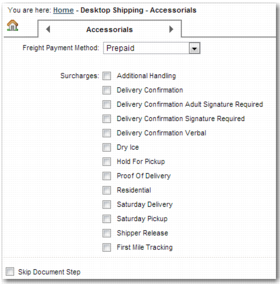
Accessorials Step
The Accessorials step offers additional services for a shipment. These services are not part of the carrier service by default. The accessorials available depend on the carrier service that the user chooses in either the Method/References step or the Services step.
Accessorials Step
Enabling Accessorials by Default
At the global level, use the DTS DEFAULT SURCHARGES system value to enter a list of the accessorials that you want to select by default.
At the template level, use the accessorialcharges field in the HIDE section of the DS-TEMPLATES <NN> system value to enter a list of the accessorials that you want to select by default. Setting the template-level system value overrides the global-level system value.
Do not select accessorials that conflict with one another, such as DeliveryConfirmationAdultSignatureRequired and DeliveryConfirmationVerbal. Regardless of the accessorials that you include in the accessorialcharges field, only the accessorials applicable to the selected service appear. Use the RT QuickPath option, or refer to your carrier, to determine the accessorials or surcharges listed for each service. For a list of accessorials, see the Message_field_Lookups tab of Appendix A on the QAD Document Library in QAD Transportation Management|v2012 R00|Admin Guides|Appendices..
Hiding Accessorials
You can hide accessorials using the Hide Accessorials section of the DS-TEMPLATES <NN> system value. The format for this system value is <SERVICE1>=<ACCESSORIAL1>,...,<ACCESSORIALN>&<SERVICE2>=<ACCESSORIAL1>,...,<ACCESSORIALN>&...<SERVICEN>=<ACCESSORIAL1>,...,<ACCESSORIALN>. It hides the accessorials listed in <ACCESSORIAL> for the service listed in <SERVICE>.
The Hide Accessorials Interim section of the DS-TEMPLATES <NN> system value works in the same way, but it applies to an interim service. If your shipment does not have an interim service associated with it, then this system value is not relevant.
Skipping the Accessorials Step
To skip this step, set the system value DTS SKIP STEP 6 to yes. This system value overrides the selection of the Accessorials step in the DS-TEMPLATES <NN> system value.