Creating a Return Label
The user can create a return shipment and accompanying label when creating an outbound shipment. The consignee can use the return label to return documentation or other items to the consignor on receipt of the initial shipment. The return shipment always uses the same carrier as the outbound shipment. If the user creates the outbound shipment on behalf of a third party, the user can specify that the address of the third party appears on the return label.
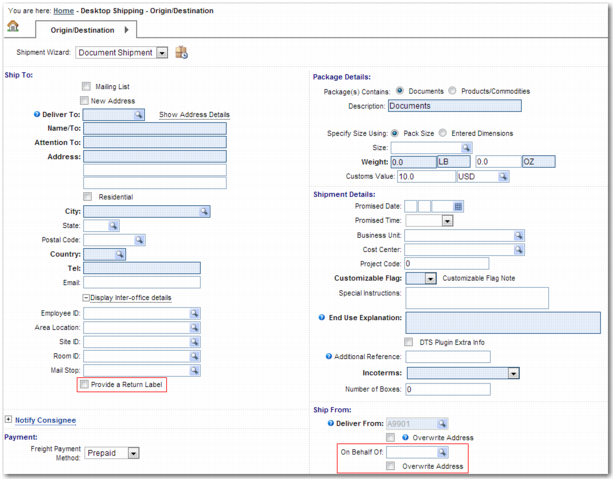
To create the return label, the user selects the Provide a Return Label field in the Ship To section of the Origin/Destination step. To include a third-party address in the return label, the user completes the On Behalf Of field in the Ship From section.
Origin/Destination Step with the Provide a Return Label and On Behalf Of Fields
Use the system values listed in
System Values to Configure the Return Label Facility to make the Provide a Return Label and On Behalf Of fields appear on the screen.
System Values to Configure the Return Label Facility
Category | Key | Description |
SPS | RETURNS - DEFAULT PACK TYPE | QBOX |
SPS | RETURNS - DEFAULT SHIP TYPE | IM |
SPS | RETURNS: SHIPMENT TYPE | 52 |
SPS | RETURNS: TRANSACTION TYPE | T |
SPS | RATING ONLY SHIP TRANS TYPES | Possible values: Comma-separated list of letters from the QuickPath option Z9. If you want to use the Return Label facility, it is important that you do not include T in this system value. This system value enables you to specify a list of shipment transaction types that you can rate but cannot ship. See Topic 029 - System Values.xls for a more thorough explanation of this system value. |
ITRAX | DTS PRINT LABELS | yes |
SYSTEM | SPS VERSION | 33 This value indicates that the version of the SPS is 33 or higher. The ability to process a return label is available from version 33 upwards. |