Messages
It is possible to configure messages to appear when the user clicks Next on a desktop shipping step. The message appears in a pop-up window. This behavior can be useful for reminding the user of checks to carry out before continuing to the next step.
To add the message as a note in the Notes screen:
1 Access the Notes screen using the NO QuickPath option.
2 Enter a note ID and the message that you want to appear on the screen.
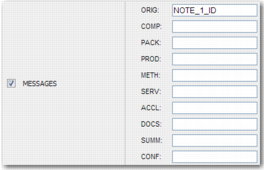
3 Go to the DS-TEMPLATES <NN> system value. The MESSAGES section of this system value contains a field for each possible step in the wizard.
MESSAGES Section of the DS-TEMPLATES <NN> System Value