Category | Key | Description |
ITRAX | RATESHOP SHIP FROM MANDATORY | Possible values: yes - the Ship From field is mandatory. no - the Ship From field is optional. Default value: yes. |
ITRAX | RATE SHOP SHOW BASE COSTS | Determines the charges that appear in the View Rates table. Possible values: Customer - displays the Buying Charge column. The Buying Charge is the amount that the shipper pays the carrier for shipping the item. Company - displays the Charge column. The Charge column contains the amount that the shipper charges the buyer for shipping the item. Both - displays both the Buying Charge and Charge columns. None - neither column displays. Default value: Company |
ITRAX | RATESHOP SHOW CHARGE BREAKDOWN | To view a breakdown of each charge in the View Rates table, set this system value to yes. An information icon  appears beside the charge amount. When the user clicks this icon, a window pops up displaying the charge breakdown information. appears beside the charge amount. When the user clicks this icon, a window pops up displaying the charge breakdown information.Possible values: yes, no Default value: no |
ITRAX | SHOW BREAKDOWN DETERMINATION | This system value applies when the RATESHOP SHOW CHARGE BREAKDOWN system value is enabled for either the Rate Shop menu option or the Rate Shop step of Desktop Shipping. If SHOW BREAKDOWN DETERMINATION is set to yes, then information on how each charge breakdown is calculated appears on the screen. Possible values: yes, no Default value: yes |
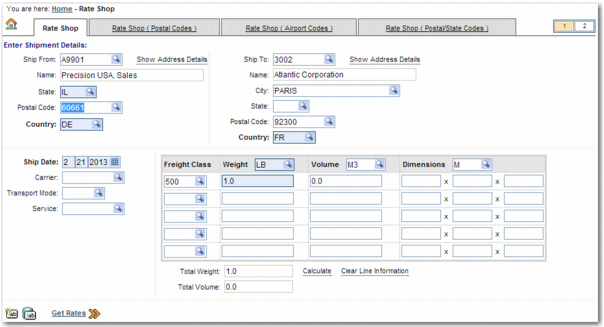
ITRAX | RATESHOP-TABS | Determines which tabs to show in Rate Shop and the order in which they appear. Possible values: ADDRESS - Rate Shop tab POSTAL - Rate Shop (Postal Codes) tab IATA - Rate Shop (Airport Codes) tab POSTALSTATE - Rate Shop (Postal/State Codes) tab Default value: POSTAL,ADDRESS |
ITRAX | SPS RATESHOP PDF FILENAME | This system value specifies the filename for the PDF file of rates that the user can save to their computer. Enter the filename without the pdf file extension. Default Value: RateShopReport |
ITRAX | SPS RATESHOP SHOW PLACE OPTION | Determines whether the To Place field appears next to the To Airport field in the Rate Shop (Airport Codes) tab. |