Category | Key | Description |
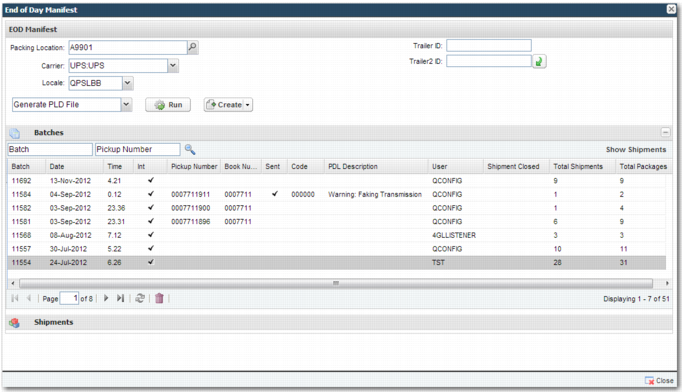
SPS | EOD - BATCH CONSTRAINT - <N> | The TrailerID and Trailer2 ID fields in EOD Manifest are examples of constraints applied to the creation of an EOD batch. These fields allow the user to create an EOD batch using a subset of shipments that a particular carrier is shipping from one packing location. In this example, the constraints are the ID numbers of trailers on which shipments are loaded. You can enter the number of the specific trailer that you want to run EOD Manifest on. Create the constraint fields using the EOD - BATCH CONSTRAINT - <N> system value, and map to fields in the shipment header table XMSHDR0. Format: LABEL=<FIELD LABEL>|FIELD=<SHIPMENT HEADER TABLE.SHIPMENT HEADER TABLE FIELD>|<GLOBAL CARRIER CODE>|<OPTIONAL/MANDATORY> <FIELD LABEL> - the text that accompanies the field on the screen. <SHIPMENT HEADER TABLE.SHIPMENT HEADER TABLE FIELD> - the name of the shipment header table and the field in the table, separated by a period. <GLOBAL CARRRIER CODE> - adding a carrier code specifies that this constraint only applies to batches created for that particular carrier. <OPTIONAL/MANDATORY> - specifies whether the field in the UI is optional or mandatory. The default value is optional. Example: LABEL=Trailer ID|FIELD=XMSHDR0.SHXNO1|UPS |
SPS | EOD - CLOSE SHIPMENTS | Possible values: yes - shipments close automatically during the EOD process after the PLD file transmits successfully to the carrier. If all of the shipments on the batch close successfully, then the batch is flagged with a Y in the GRSTSF field to indicate that the batch is fully closed. If some of the shipments fail to close, then the next time an option is run against the batch, the process attempts to close out the remaining open shipments. The batch itself is only flagged as closed when all of the shipments are closed. no - shipments do not close automatically during the EOD process after the PLD file transmits successfully to the carrier. Default value: no. |
SPS | END OF DAY CARRIERS - <LOCATION CODE> | This system value allows you to restrict the carriers that appear on the EOD Manifest screen for a specific location. It consists of a comma-separated list of global carrier codes that are applicable for the selected packing location Example: END OF DAY CARRIERS - ABC with a value of PURO,UPS This example shows that for packing location ABC, the only available carriers are Purolator (PURO) and UPS. |
ITRAX | EOD PDF ACTION | Specify the EOD action performed when the PDF button is selected. It should be tied to the action drop-down menu. Possible values are PRTSUMMARY, PRTDETAIL, PRTLABEL, PRTHAZMAT. The default value is PRTSUMMARY. |
SPS | EOD - CREATE BUTTON OPTIONS | Use this system value to allow multiple batches to be created in one step. Possible values: ALL, SELECTED, NONE Default value: NONE This system value is available in the Web UI only. |
SPS | <CARRIER>: END OF DAY UNIT - <LOCN> | Use this system value to run the steps in the EOD process one at a time or in a continuous sequence. Setting this system value to no allows the user to step through the EOD options without having the system automatically run through the remaining options. For example, it is possible to run Create Batch without automatically running Generate PLD File. Possible values: yes, no Default value: yes |
SPS | <CARRIER>: SHIP REFERENCES | Use this system value to create references to send to carriers. Carriers use these references for tracking purposes at the carrier side, or for reports from the carrier side that are sent to the receiver. These references are also printed on the carrier labels. You can configure these references per transaction, or specify a default list of references for the system as a whole. Enter a comma-separated list of values. The number of codes that carriers accept varies. If you specify more than the maximum allowed by the carrier, then the references that exceed the limit set by the carrier are ignored. For a list of possible values for this system value, see the SPS tab of Appendix A on the QAD Document Library in QAD Transportation Management|v2012 R00|Admin Guides|Appendices. This system value does not apply to the carrier UPS. For UPS, this configuration is made using the system value UPS: CUST REFERENCE. |
SPS | UPS: CUST REFERENCE | This system value has the same purpose as <CARRIER>: SHIP REFERENCES. It applies to the UPS carrier. The system value <CARRIER>: SHIP REFERENCES does not apply to UPS. |
SPS | <CARRIER>: SHIP REFERENCES - <LOCN> | This system value is similar to <CARRIER>: SHIP REFERENCES, but it allows you to create references for carriers that relate to a particular packing location. |
SPS | EOD: <CARRIER> OPTION <NUMBER> | Use this system value to configure buttons that appear on the EOD Manifest screen for a particular carrier. To create the carrier-specific key, replace <CARRIER> with the carrier code and <NUMBER> with a three-digit number that determines the order of the options configured for the button. Example: System Value key: EOD: UPS OPTION 020 System Value contents: CREATEFILE,Generate PLD File,xtnote_u,xtnote_d,02,UPSPLD,,,NON-CUST,01, There are 11 possible fields: • Field 1: A unique code to indicate the purpose of the new option. • Field 2: A description that appears in the tooltip for this button. • Field 3: An image file that displays when the button is enabled. • Field 4: An image file that displays when the button is disabled. • Field 5: The option type for this action, as listed in the corresponding QuickPath option. • Field 6: The option name for this action, as listed in the corresponding QuickPath option. • Field 7: If the requirement is to print a document for batch, specify the document type. • Field 8: If the requirement is to print a document for batch, specify the document reference. • Field 9: Set to NON-CUST to have the button appear in the set of buttons on the top left of the SPSEOD screen, and to include the action as part of the standard EOD set of options. Set to CUST to configure the button to appear on the top right of the SPSEOD screen, rather than running the action directly as part of the standard EOD set of options. • Field 10: The Batch Status before the task is run, which is the status that must be on the batch before it is possible to run this option. • Field 11: The Batch Status after the task is successfully run. This system value replaces the system value SPSEOD: <carrier> OPTION <number>, which is obsolete. Use this system value to configure EOD options when the options are closely linked with the actual carrier options and perform an action in sequence with other carrier options. |
SPS | EOD SPLIT CARRIER: [global carrier] | This system value determines whether a particular carrier is split into more than one carrier for the EOD process. This is necessary when a carrier is divided into two particular business units, and when it requires that its EOD process is run separately for each of these business units. Example: FedEx is divided into FedEx Express and FedEx Ground - these have two separate carrier pickups. The configuration of the integration is the same for both businesses of this carrier, but the EOD processes run separately. Key: EOD SPLIT CARRIER: FEDEX Value: FEDEX,FDXGND This example displays the carriers FEDEX and FDXGND on the EOD screen. |
SPS | EOD SPLIT SERVICES: [business carrier] | This system value applies whether the carrier is divided into more than one business for EOD processing using the system value EOD SPLIT CARRIER: [global carrier]. It determines what services are applicable to the different splits of the carrier. The system value includes the list of services applicable to this particular business of the carrier. Example: Key: EOD SPLIT SERVICES: FDXGND Value: GND,HOME In this example, the FDXGND business carrier is applicable for the services GND and HOME only, for the global carrier FEDEX. |
SPS | EOD - NOT APPLICABLE FOR BATCH | System value format: [Field1=Value1,Value2]|[Field2=Value3] The | symbol represents the logical OR. If Field1 is equal to either Value1 or Value 2, or Field2 is equal to Value3, then the shipment is not eligible for batch processing. Possible fields: • SHPCOL • SHSTSF • SHSSTS • SHGRUP • SHOREF • SHCREF • SHFREF • SHBREF Reserved keyword values are: **BLANK** - to indicate that the value condition is blank Example: SHSTSF=XX|SHSSTS=**BLANK** The shipment is not eligible for EOD processing if the SHSTSF field contains a value of XX, or if the SHSSTS field is blank. |
SPS | UPLOAD FAILURE FROM USER | You can configure the system to e-mail users when the EOD process does not complete successfully for a particular carrier or packing location. The user then manually intervenes in the EOD process when necessary. It is recommended that email notifications are put in place for environments that use black box messaging, as there is no user interface. Value: Holds the username of the person on whose behalf the system sends the e-mails. Example: MYUSER In this example, the email address of the From User is determined by finding the MYUSER record in option US. Next, using the Employee partner field on the User record, the system finds the NR record for this Employee partner value. Then, in option NR, the Email field (NREML) is referenced to find the email address applicable for the From User For more information, see the system values UPLOAD FAILURE MESSAGES and UPLOAD FAILURE METHOD in the SPS tab of Appendix A on the QAD Document Library in QAD Transportation Management|v2012 R00|Admin Guides|Appendices. Alternatively, from S23 onwards, it is possible to avoid setting up records through options US and NR, and to allow explicit entry of email addresses instead. This is done by prefixing the system value with the word EMAIL. Example: EMAIL: [email protected] In this example, the e-mail address of the From User is [email protected]. |