Drop-Off Locator
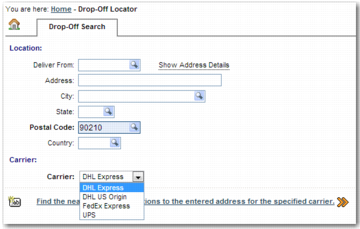
A drop-off location is a building or post box where the shipper can deposit shipments for collection and transportation by the carrier. The Drop-Off Locator option allows the shipper to access the carrier’s drop-off locator web page using the Carrier drop-down list.
Drop-Off Locator Screen
You can add values to the Carrier drop-down list in the Drop-Off Locator screen by creating a system value for each carrier. Each value links to a URL for the particular carrier’s drop-off locator page.
System Values: Drop-Off Locator Screen displays the format of the system value that you use to configure the Carrier field on the Drop-off Locator screen.
Note: This facility depends on carriers providing drop-off location information publicly over the Internet. The solution performs a HTTP GET request with the captured parameters and redirects the user to the carrier page with the results. The websites that carriers use to display drop-off locator information are subject to change; any change requires a review of the system values used.
System Values: Drop-Off Locator Screen
System Value Category | System Value Key | Function |
ITRAX | <CARRIER_CODE>: DROP LOCATOR RESULT URL | Enter the URL to open when the user selects <CARRIER_CODE> from the Carrier drop-down list and clicks Find the nearest drop-off locations to the entered address for the specified carrier. Example: FEDEX: DROP LOCATOR RESULT URL might have the value: http://www.fedex.com/Dropoff/SearchAction.do?actionText=findlocation&locale=en_US&appId=DotCom&errorCode=&selectedAmbigousIndex=0&searchType.fedExStaffed=on&searchType.selfService=on&searchType.fasc=on&searchAddress.streetAddress=<address>&searchAddress.city=<city>&searchAddress.stateProvince=<state>&searchAddress.postalCode=<postalcode> |