Parties Tab
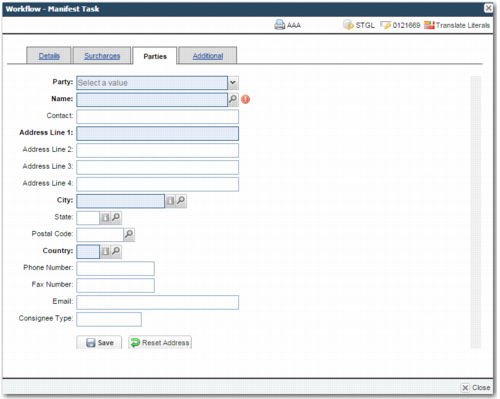
Manifest Task: Parties Tab displays the Parties tab. This tab allows you to view the addresses of the Ship To, Third Party, Customer, COD Party, Shipper, and Hold for pickup parties. Depending on how the administrator configures this tab, it is also possible to update some of these addresses. Select the party from the Party field and view or update the corresponding address.
Manifest Task: Parties Tab
Additional Tab
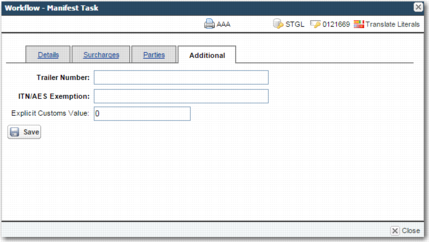
Your administrator can also configure the Additional tab to appear in the Manifest task. This tab contains:
• general fields
• carrier-specific fields
• other fields that the administrator can add when required
Manifest Task: Additional Tab
The general fields on the Additional tab are:
Trailer Number
A trailer number associated with the shipment. This field does not appear by default; your administrator must configure the system to display it.
ITN/AES Exemption
Inventory Tracking Number/Automated Export System exemption details.
Explicit Customs Value
The explicit customs value of the shipment.
The right column of the tab contains carrier-specific fields that vary depending on the route assigned to the shipment.
Carrier-Specific Fields
Carrier | Field |
FedEx | Ship Alert E-Mail |
FedEx | Shipper Language |
FedEx | Recipient Language |
FedEx | Broker Language Code |
FedEx | Ship Alert flag |
FedEx | Ship Pod flag |
FedEx | Recip Alert flag |
FedEx | Recip Pod flag |
FedEx | Broker Alert flag |
FedEx | Priority Alert flag |
FedEx | Broker Account |
FedEx | Broker Id |
FedEx | Broker Pager |
UPS | Paperless Invoice flag |
DHL | Neutral Delivery Service flag |
DHL | Recipient IATA Code |