Enter Shipment Details
Enter details of the shipment, including the origin and destination address, the expected ship date of the shipment, and a description of the items that you are shipping. A number of different tabs can be displayed in this step.
• Rate Shop
• Rate Shop (Postal Codes)
• Rate Shop (Airport Codes)
• Rate Shop (Postal/State Codes)
Note: Your administrator determines which of these tabs appear. The only difference between the tabs is the contents of the Address Details section.
Rate Shop Tab
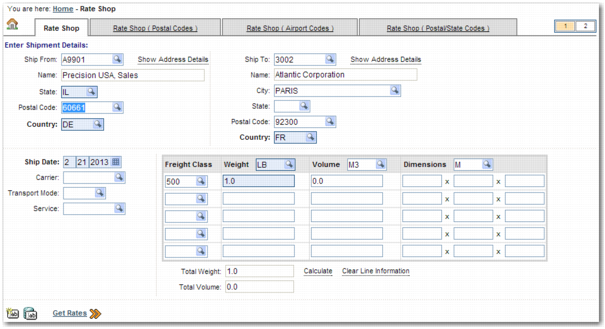
Rate Shop Tab displays the Rate Shop tab.
Rate Shop Tab
There are a number of fields on this tab.
Ship From
The partner code of the shipment’s origin address. Enter the partner code. To automatically populate the Postal Code field below the Ship From field, click Show Address Details.
Name
The name of the shipper company.
State, Postal Code, Country
The origin state, postal, and country codes.
Ship To
The partner code of the shipment destination address. Enter the partner code. To automatically populate the Postal Code field below the Ship To field, click Show Address Details.
Name.
The name of the consignee company.
City, State, Postal Code, Country
The destination city, state, postal, and country codes.
Ship Date
The expected shipping date of the items.
Carrier
To check the cost of shipping with a specific carrier, enter the carrier code here.
Transport Mode
To check the rates for sending the shipment by a particular means of transport—for example, road or rail—enter the mode here.
Service
To check the cost of shipping using a specific service, enter the service code here.
The table on the right of the screen allows you to specify physical and other characteristics of each pack in the shipment. This information is used to estimate the cost of shipping the items. The Freight Class field is used to rate truck load (TL) and less than truckload (LTL) shipments. Small parcel shipments are typically rated using the weight, volume, and dimensions fields.
Freight Class
A code that determines how the carrier handles the pack and the associated cost structure. The code relates to shipment physical characteristics such as volume, density, and weight, along with other characteristics, including monetary value. Many carriers use the US-based National Motor Freight Traffic Association, Inc. (NMFTA) freight classification codes. Other carriers have their own set of freight classes. The freight class field is used for TL and LTL shipments.
Weight
The weight of the pack. Specify the unit of measure using the lookup icon.
Volume
The volume of the pack. Specify the unit of measure using the lookup icon.
Dimensions
The length, width, and height of the pack. Specify the unit of measure using the lookup icon.
Total Weight
The total weight of the shipment.
Total Volume
The total volume of the shipment.
To calculate the values of the Total Weight and Total Volume fields using the contents of the Weight and Volume fields, click Calculate.
To clear all measurements from the Item Details section, click Clear Line Information.
To clear all fields on the screen, Click the Clear Form

icon.
To populate the fields on the screen with data that you previously entered on the screen, click the Refresh Using Saved Data

icon. The screen refreshes with the data that you most recently entered before clicking Get Rates.
Rate Shop (Postal Codes) Tab
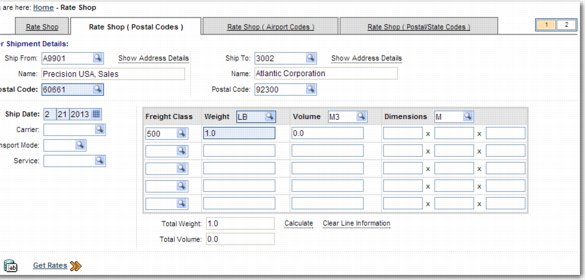
Rate Shop (Postal Codes) Tab displays the Rate Shop (Postal Codes) tab. This tab is the same as the Rate Shop tab, apart from the address fields. The Ship From and Ship To addresses each contain a field for the location code, company name, and postal code.
Rate Shop (Postal Codes) Tab
Rate Shop (Airport Codes) Tab
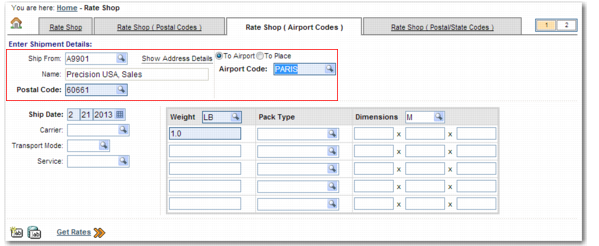
Rate Shop (Airport Codes) Tab displays the Rate Shop (Airport Codes) tab. This tab is the same as the Rate Shop tab, apart from the address fields. The Ship From address contains a field for the location code, company name, and postal code. The Ship To address contains a field for the airport code.
Rate Shop (Airport Codes) Tab
Rate Shop (Postal/State Codes) Tab
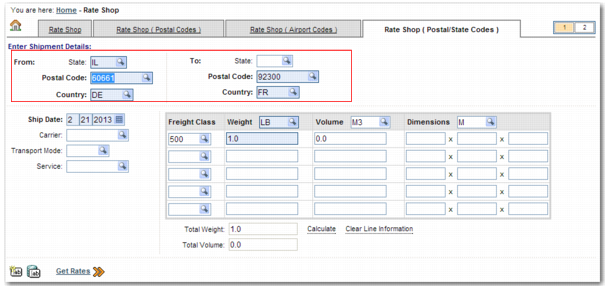
Rate Shop (Postal/State Codes) Tab displays the Rate Shop (Postal/State Codes) tab. This tab is the same as the Rate Shop tab, apart from the address fields. The Ship From and Ship To addresses each contain a field for the state, postal code, and country.
Rate Shop (Postal/State Codes) Tab
Enter the shipment details in the appropriate tab and click Get Rates.