View Rates
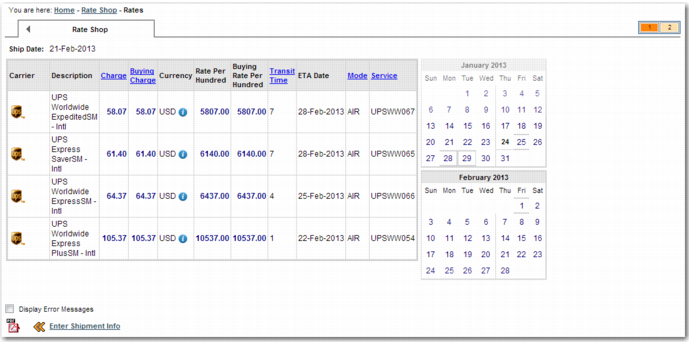
When you fill in the Enter Shipment Details screen and click Get Rates, a message is displayed, advising you that rates are being retrieved. When the rates are retrieved, they are displayed in a table similar to the one in
Rate Shop Results.
Rate Shop Results
To view Services that were not selected due to errors, select Display Error Messages.
Rates Table Columns lists the columns that appear in the Rate Shop table.
Rates Table Columns
Column | Explanation |
Carrier | The carrier offering the service. |
Description | A description of the service. |
Charge | The amount that the shipper charges the customer for shipping. |
Buying Charge | The amount that the shipper pays the carrier for shipping. |
Currency | The currency in which the charges appear. |
Rate Per Hundred | The amount that the shipper charges the customer for shipping one hundred pounds of weight using this service. |
Buying Rate Per Hundred | The amount that the shipper pays to the carrier for shipping one hundred pounds of weight using this service. |
Transit Time | An estimate of the number of days it takes for the shipment to reach the destination using this service. |
ETA Date | The date that the shipment is expected to arrive at the destination. This field can also include an estimate of the delivery time. |
Mode | The mode of transport; for example, air or road. |
Service | A code that identifies the service. |
Error | If the cost of the service cannot be calculated due to an error, the error code appears in this column. |
Error Description | If the cost of the service cannot be calculated due to an error, a description of the error appears in this column. |
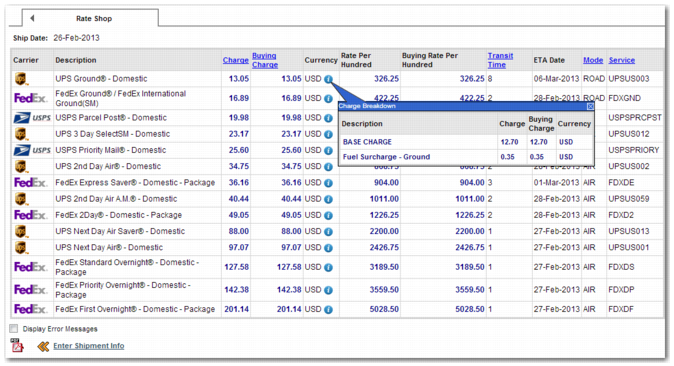
To see a detailed breakdown of charges for a service, click the information icon in the Currency column. A charge breakdown pop-up window appears, as in
Rate Shop Results with Charge Breakdown.
Rate Shop Results with Charge Breakdown
The charges are split into a number of sections, including a section for the base charge, and sections for additional handling or fuel surcharges. A number of fields can appear in the Charge Breakdown pop-up window. The charges that appear depend on the shipment. Possible fields in the Charge Breakdown section include:
Recipient
Details of the destination address.
Zone
A code identifying the shipping zone. This field is applicable if the carrier service rate structure is based on zones. The zone depends on the origin and destination of the shipment. For each origin address, the carrier has a table that allocates all possible destinations to a particular zone. Nearby destinations are in a different shipping zone than remote destinations. The cost of shipping to each zone varies.
Rating Break
If the carrier service rate structure is based on zones, then this field contains the rating break within the carrier service rate structure that is used to calculate the shipping cost.
Rate per pack number <n>
The cost of shipping pack <n>.
Freight Charge
The cost of freight.
Additional Handling
The charge for additional handling related to the shipment.