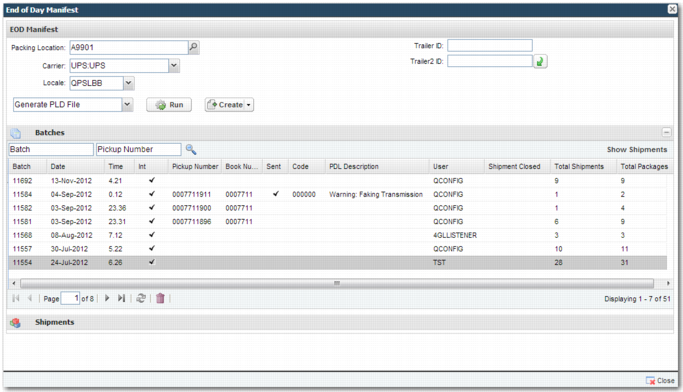
Column | Explanation |
Batch | A unique, system-generated number assigned to the created batch. |
Date | The date that the batch was run. |
Time | The manifest time, assigned based on the time that the EOD manifest is run. |
Int | If the batch contains international shipments, this column contains a check mark. |
Invoice No | The invoice number associated with the shipment. |
Pickup Number | A unique reference assigned to the batch. The carrier requires this reference number to track the batch or manifest. |
Book Number | The book number associated with the shipment. |
Page | This field applies to UPS shipments. |
Sent | A check mark appears in this column if the batch electronic manifest file, also known as the PLD (Package Level Detail) file, has been sent to the carrier. |
Code | An error code associated with the batch, which appears when there is an error in generating or sending the PLD file. |
PLD Description | Information on the status of the PLD file. It indicates if there were any errors when generating the file, and whether the file was transmitted to the carrier successfully. |
World Ease | World Ease is a UPS service. If the batch is a UPS batch and contains World Ease shipments, this column contains a check mark. |
User | The PRECISION user who created the batch. |
Shipment Closed | If the shipments of this batch have been closed as part of the end-of-batch process, this column contains a check mark. |
Total Shipments | The number of shipments in the batch. |
Total Packages | The number of packages in the batch. |
Hazardous | If the batch contains shipments containing hazardous material, this column contains a check mark. |
Additional Info | Other information about the shipment. |

Operation | Explanation |
Create PLD File | Create the PLD file in a carrier-approved format. |
Generate PLD File | Generate the PLD file in a carrier-approved format. |
Send PLD File | Send the PLD file to the carrier. |
Print Summary Label | This option applies to UPS batches only. The summary label contains a breakdown of the carrier services included in the batch, and how many of the shipments and packages are listed for each service. |
Print Summary Manifest | This operation applies to UPS batches only. Prints a paper manifest summarizing the shipments included in the current batch. The currently defined print locale determines the printer that the manifest prints to. |
Print Detail Manifest | Prints a detailed paper manifest with information about the shipments included in the batch. If the Send PLD File operation fails, you can use the paper manifest as a backup. |
Print Worldease Invoice | This summary is only available for UPS batches that include shipments using the UPS World Ease service. |
Print Worldease Doc Box | This operation is only available for UPS batches that include shipments using the UPS World Ease service. Use this operation to print a UPS World Ease label that applies to the first package of the entire World Ease shipment. This label is referred to as the Doc Box as it contains all documentation necessary to transport the shipment. |
Print Hazardous Manifest | This operation is only available for UPS batches. It allows you to print a specific document relating to any hazardous materials in the batch. |
Package Exception Management | Attaches Package Exception Management (PEM) shipping plans to shipments in the batch. |
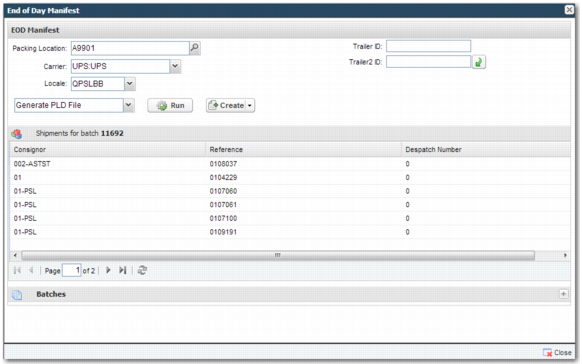
Column | Explanation |
Consignor | The shipper. |
Reference | A reference number for the shipment. |
Despatch Number | A despatch number related to the shipment. |