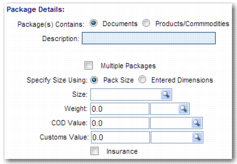
Package Details
Use the Package Details section to enter information about the items that you are shipping. If you are shipping a single package, use the fields in this section to specify the details of that package. Enabling the Multiple Packages field gives you the opportunity to enter details for multiple packages in the Package Details step.
Package(s) Contains
Select Documents or Products/Commodities, depending on the content of the package.
Description
Enter a brief description of the package.
Multiple Packages
If the shipment contains multiple packages, select this field. When selected, it hides the other fields in this section apart from the Package(s) Contains and Description fields. As you move through the Desktop Shipping Wizard, you can add information on these multiple packages using the Package Details and Products steps.
Specify Size Using
Use this field with the Size field. To enter the pack type in the Size field, select Pack Size. To specify the length, width, and height of the pack in the Size fields, select Entered Dimensions.
Size
Use this field with the Specify Size Using field. If Specify Size Using is set to Pack Size, enter the pack type in the Size field. If Specify Size Using is set to Entered Dimensions, specify the length, width, and height of the pack, along with the unit of measure, in the Size fields.
Weight.
Enter the weight of the pack in the first field, and enter the unit of measure in the second field.
COD Value
Collect on Delivery Value. Enter the collect on delivery value of the pack in the first field. Specify the currency in the second field.
Customs Value
Enter the customs value of the pack in the first field. Specify the currency in the second field.
Insurance
Select this field to specify the insurance value of the pack. Enter the insurance amount and currency in the Insurance Value fields that appear on the screen.
Origin/Destination Step: Package Details Section