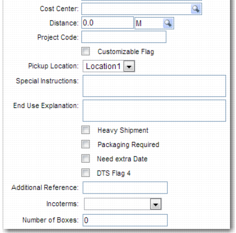
Shipment Details
The Shipment Details section allows you to specify shipment delivery details.
Promised Date, Promised Time
The date and time that you agree to deliver the shipment to your customer.
Business Unit
The business unit sending the shipment.
Cost Center
The cost center related to the shipment.
Distance
The distance that the shipment is traveling.
Project Code
A project code identifying the shipment that the project relates to.
Pickup Location
The place where the carrier collects the shipment.
Special Instructions
Any important notes relating to the shipment.
End Use Explanation
An explanation of the purpose of the shipped items.
Heavy Shipment
Select this field to mark the shipment as a heavy shipment.
Packaging Required
Select this field if the shipment requires packaging.
Need extra Date
If you require an extra date to record details of the shipment, select this field. If you select this field, then the date, month, and year fields appear on the screen. This field may appear with a different name, depending on how your administrator configures your system.
DTS Flag 4
An additional field that your administrator can configure with a different text name, depending on the process that your department uses.
Additional Reference
If there are multiple legs associated with the shipment, use this field to record the main shipment reference.
Incoterms/Delivery Terms
The International Commercial Terms, or Incoterms, are internationally accepted definitions and rules of interpretation of common commercial terms including ex works, and carriage paid to. Choose from the available terms in the drop-down menu.